> ## Documentation Index
> Fetch the complete documentation index at: https://cometchat-013b37f0.mintlify.site/llms.txt
> Use this file to discover all available pages before exploring further.
# Scheduler Bubble
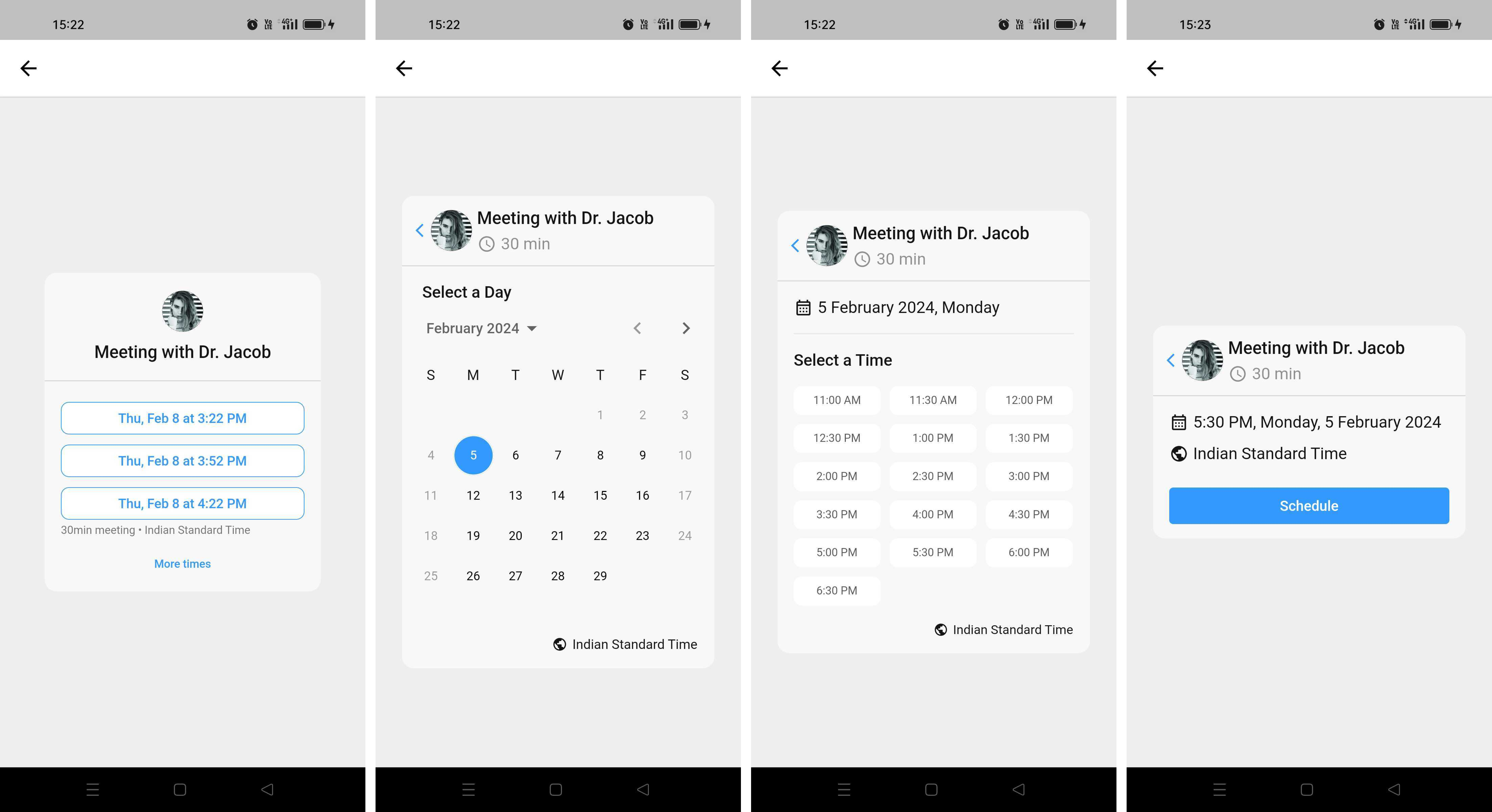
CometChatSchedulerBubble is a versatile type of message widget designed to facilitate easy and efficient event scheduling. It offers the following key features:
1. **Event Scheduling:** Users can send a calendar-like invitation, similar to `Calendly`, allowing the recipient to schedule a meeting conveniently.
2. **Flexible event Parameters**: Senders have the flexibility to set allowed event times and define the time intervals between consecutive events.
3. **Customisable Availability Hours**: Message senders can personalise their availability by specifying a range of hours during which meetings can be scheduled.
4. **ICS File Integration**: Seamlessly integrates with ICS files, analysing the data to provide users with available time slots based on their free time.
5. **Developer Configuration**: As a developer, you have the freedom to configure actions triggered upon scheduling button clicks. This ensures that the platform can be tailored to specific needs and workflows.
`CometChatSchedulerBubble` aims to streamline the event scheduling process, offering a user-friendly experience for both senders and recipients. With its robust features, it provides a dynamic solution for coordinating and managing meetings efficiently.
 ## Properties
| Properties | Type | Description |
| ------------------------- | -------------------------------------------------------------- | ------------------------------------------------------------------------------------------------------------------------------------------------------------------------------------------------------------------------- |
| **message** | SchedulerMessage | An instance of the `SchedulerMessage` class which holds information about the event scheduling availability. |
| **style** | SchedulerBubbleStyle | An object of styles for customizing the UI of the meeting bubble. You can override styles for the wrapper, title, goal completion text, schedule button, etc. If a style is not provided, the default style will be used. |
| **onScheduleClick** | ((\_ dateTime: String?, \_ message: SchedulerMessage) -> Void) | The provided parameter is responsible for managing the on-click callback functionality. By default, this parameter initiates a call to the specified URL as outlined in the example below |
| **timeSlotSelectorStyle** | TimeSlotSelectorStyle | accepts an object of TimeSlotSelectorStyle which is used to customize the appearance of CometChatTimeSlotSelector |
## SchedulerBubbleStyle
`SchedulerBubbleStyle` is a class extending `BaseStyle` containing attributes to customize the appearance of the `CometChatSchedulerBubble` component.
| Properties | Type | Description |
| -------------------- | -------------------- | ----------------------------------------------------------------------- |
| **background** | UIColor | used to set the background color |
| **borderWidth** | CGFloat | used to set border |
| **cornerRadius** | CometChatCornerStyle | used to set border radius |
| **borderColor** | UIColor | used to set border color |
| **avatarStyle** | AvatarStyle | used to set the style for the avatar in the scheduler bubble |
| **messageTintColor** | UIColor | used to set the tint color for overall message. |
| **titleFont** | UIFont | used to set the title font |
| **lisItemStyle** | ListItemStyle | used to style header View of all the views inside the message bubble |
| **dividerTint** | UIColor | used to set tint color for divider in message bubble |
| **titleTint** | UIColor | used to set the tint color for messgae title |
| **deactivatedTint** | UIColor | used to set tint color when the message in not intractable to the user. |
## Usage
CometChatSchedulerBubble allows for a dynamic combination of developer-provided data and data collected from the user's interaction. It provides flexibility for developers to customize the behaviour of the scheduler button and integrate it seamlessly into their application.
```php theme={null}
let schedulerMessage = SchedulerMessage()
schedulerMessage.duration = 60
schedulerMessage.title = "Meet Dr. Jackob"
schedulerMessage.bufferTime = 15
schedulerMessage.avatarURL = "https:__encrypted-tbn0.gstatic.com_images?q=tbn:ANd9GcRdRz0HEBl1wvncmX6rU8wFrRDxt2cvn2Dq9w&usqp=CAU"
schedulerMessage.goalCompletionText = "Meeting Scheduled Successfully!!"
schedulerMessage.timezoneCode = TimeZone.current.identifier
schedulerMessage.dateRangeStart = Int(Date().timeIntervalSince1970)
schedulerMessage.dateRangeEnd = Int(Date().addingTimeInterval(30 * 24 * 60 * 60).timeIntervalSince1970)
schedulerMessage.receiverUid = "cometchat-uid-1"
schedulerMessage.receiverType = .user
schedulerMessage.availability = [
"monday": [TimeRange(startTime: "0000", endTime: "1359")],
"tuesday": [TimeRange(startTime: "0000", endTime: "1559")],
"wednesday ": [TimeRange(startTime: "0000", endTime: "0659")],
"thuesday": [TimeRange(startTime: "0000", endTime: "0959")],
"friday": [TimeRange(startTime: "0000", endTime: "1059")],
]
let clickAction = APIAction()
clickAction.url = "https:__abc.com"
clickAction.payLoad = ["isPayloadPresent": true]
let scheduleElement = ButtonElement(elementType: .button, elementID: "21", clickAction: clickAction, buttonText: "Submit")
schedulerMessage.scheduleElement = scheduleElement
let schedulerBubble = CometChatSchedulerBubble()
.set(style: schedulerBubbleStyle)
.set(message: schedulerMessage)
schedulerBubble.translatesAutoresizingMaskIntoConstraints = false
self.addSubView(schedulerBubble)
```
### SchedulerBubble Triggered Request to Endpoint
After user interaction, the `SchedulerBubble` generates a request to the specified endpoint i.e upon clicking the schedule button. Like in above example scheduler bubble will trigger a POST request to abc.com
The request includes the following payload and headers:
#### Headers:
```json theme={null}
{
"accept": "application_json",
"content-type": "application_json"
}
```
#### Payload:
```json theme={null}
{
"appID": "XXXX",
"region": "XX",
"trigger": "ui_message_interacted",
"payload": {
"key1": "value1"
},
"data": {
"conversationId": "user1_user_user4",
"sender": "user1",
"receiver": "user4",
"receiverType": "user",
"messageCategory": "interactive",
"messageType": "scheduler",
"messageId": 373,
"interactionTimezoneCode": "Asia_Kolkata",
"interactedBy": "user4",
"interactedElementId": "1",
"schedulerData": {
"meetStartAt": "2024-02-15T01:00",
"duration": 60
}
}
}
```
| Properties | Description |
| ----------------------- | -------------------------------------------------------------------------------------------------------------- |
| meetStartAt | time slot selected by user |
| duration | duration for the meeting |
| `appID` | app id of the application |
| `region` | The text message |
| `payload` | The type of the receiver- `CometChatReceiverType.user` (user) or `CometChatReceiverType.group` (group) |
| conversationId | The type of the message that needs to be sent which in this case can be: `CometChatMessageType.text`\_\_(text) |
| sender | `UID` of the message sender |
| receiver | `UID` of the user or `GUID` of the group receiving the message |
| receiverType | The type of the receiver- `CometChatReceiverType.user` (user) or `CometChatReceiverType.group` (group) |
| messageCategory | The category of the message - MessageCategoryConstants.interactive |
| messageType | The type of message which is MessageTypeConstants.scheduler |
| messageId | The id of the message |
| interactionTimezoneCode | The time zone of user's device |
| interactedBy | The User id of interacting user |
| interactedElementId | The element id of element making the requiest |
if header is provided in the action meeting bubble will not add anything to the header while generating the request
## Properties
| Properties | Type | Description |
| ------------------------- | -------------------------------------------------------------- | ------------------------------------------------------------------------------------------------------------------------------------------------------------------------------------------------------------------------- |
| **message** | SchedulerMessage | An instance of the `SchedulerMessage` class which holds information about the event scheduling availability. |
| **style** | SchedulerBubbleStyle | An object of styles for customizing the UI of the meeting bubble. You can override styles for the wrapper, title, goal completion text, schedule button, etc. If a style is not provided, the default style will be used. |
| **onScheduleClick** | ((\_ dateTime: String?, \_ message: SchedulerMessage) -> Void) | The provided parameter is responsible for managing the on-click callback functionality. By default, this parameter initiates a call to the specified URL as outlined in the example below |
| **timeSlotSelectorStyle** | TimeSlotSelectorStyle | accepts an object of TimeSlotSelectorStyle which is used to customize the appearance of CometChatTimeSlotSelector |
## SchedulerBubbleStyle
`SchedulerBubbleStyle` is a class extending `BaseStyle` containing attributes to customize the appearance of the `CometChatSchedulerBubble` component.
| Properties | Type | Description |
| -------------------- | -------------------- | ----------------------------------------------------------------------- |
| **background** | UIColor | used to set the background color |
| **borderWidth** | CGFloat | used to set border |
| **cornerRadius** | CometChatCornerStyle | used to set border radius |
| **borderColor** | UIColor | used to set border color |
| **avatarStyle** | AvatarStyle | used to set the style for the avatar in the scheduler bubble |
| **messageTintColor** | UIColor | used to set the tint color for overall message. |
| **titleFont** | UIFont | used to set the title font |
| **lisItemStyle** | ListItemStyle | used to style header View of all the views inside the message bubble |
| **dividerTint** | UIColor | used to set tint color for divider in message bubble |
| **titleTint** | UIColor | used to set the tint color for messgae title |
| **deactivatedTint** | UIColor | used to set tint color when the message in not intractable to the user. |
## Usage
CometChatSchedulerBubble allows for a dynamic combination of developer-provided data and data collected from the user's interaction. It provides flexibility for developers to customize the behaviour of the scheduler button and integrate it seamlessly into their application.
```php theme={null}
let schedulerMessage = SchedulerMessage()
schedulerMessage.duration = 60
schedulerMessage.title = "Meet Dr. Jackob"
schedulerMessage.bufferTime = 15
schedulerMessage.avatarURL = "https:__encrypted-tbn0.gstatic.com_images?q=tbn:ANd9GcRdRz0HEBl1wvncmX6rU8wFrRDxt2cvn2Dq9w&usqp=CAU"
schedulerMessage.goalCompletionText = "Meeting Scheduled Successfully!!"
schedulerMessage.timezoneCode = TimeZone.current.identifier
schedulerMessage.dateRangeStart = Int(Date().timeIntervalSince1970)
schedulerMessage.dateRangeEnd = Int(Date().addingTimeInterval(30 * 24 * 60 * 60).timeIntervalSince1970)
schedulerMessage.receiverUid = "cometchat-uid-1"
schedulerMessage.receiverType = .user
schedulerMessage.availability = [
"monday": [TimeRange(startTime: "0000", endTime: "1359")],
"tuesday": [TimeRange(startTime: "0000", endTime: "1559")],
"wednesday ": [TimeRange(startTime: "0000", endTime: "0659")],
"thuesday": [TimeRange(startTime: "0000", endTime: "0959")],
"friday": [TimeRange(startTime: "0000", endTime: "1059")],
]
let clickAction = APIAction()
clickAction.url = "https:__abc.com"
clickAction.payLoad = ["isPayloadPresent": true]
let scheduleElement = ButtonElement(elementType: .button, elementID: "21", clickAction: clickAction, buttonText: "Submit")
schedulerMessage.scheduleElement = scheduleElement
let schedulerBubble = CometChatSchedulerBubble()
.set(style: schedulerBubbleStyle)
.set(message: schedulerMessage)
schedulerBubble.translatesAutoresizingMaskIntoConstraints = false
self.addSubView(schedulerBubble)
```
### SchedulerBubble Triggered Request to Endpoint
After user interaction, the `SchedulerBubble` generates a request to the specified endpoint i.e upon clicking the schedule button. Like in above example scheduler bubble will trigger a POST request to abc.com
The request includes the following payload and headers:
#### Headers:
```json theme={null}
{
"accept": "application_json",
"content-type": "application_json"
}
```
#### Payload:
```json theme={null}
{
"appID": "XXXX",
"region": "XX",
"trigger": "ui_message_interacted",
"payload": {
"key1": "value1"
},
"data": {
"conversationId": "user1_user_user4",
"sender": "user1",
"receiver": "user4",
"receiverType": "user",
"messageCategory": "interactive",
"messageType": "scheduler",
"messageId": 373,
"interactionTimezoneCode": "Asia_Kolkata",
"interactedBy": "user4",
"interactedElementId": "1",
"schedulerData": {
"meetStartAt": "2024-02-15T01:00",
"duration": 60
}
}
}
```
| Properties | Description |
| ----------------------- | -------------------------------------------------------------------------------------------------------------- |
| meetStartAt | time slot selected by user |
| duration | duration for the meeting |
| `appID` | app id of the application |
| `region` | The text message |
| `payload` | The type of the receiver- `CometChatReceiverType.user` (user) or `CometChatReceiverType.group` (group) |
| conversationId | The type of the message that needs to be sent which in this case can be: `CometChatMessageType.text`\_\_(text) |
| sender | `UID` of the message sender |
| receiver | `UID` of the user or `GUID` of the group receiving the message |
| receiverType | The type of the receiver- `CometChatReceiverType.user` (user) or `CometChatReceiverType.group` (group) |
| messageCategory | The category of the message - MessageCategoryConstants.interactive |
| messageType | The type of message which is MessageTypeConstants.scheduler |
| messageId | The id of the message |
| interactionTimezoneCode | The time zone of user's device |
| interactedBy | The User id of interacting user |
| interactedElementId | The element id of element making the requiest |
if header is provided in the action meeting bubble will not add anything to the header while generating the request