> ## Documentation Index
> Fetch the complete documentation index at: https://cometchat-013b37f0.mintlify.site/llms.txt
> Use this file to discover all available pages before exploring further.
# Call Logs
## Overview
`CometChatCallLogs` is a [Component](/ui-kit/ios/components-overview#components) that shows the list of Call Log available . By default, names are shown for all listed users, along with their avatar if available.
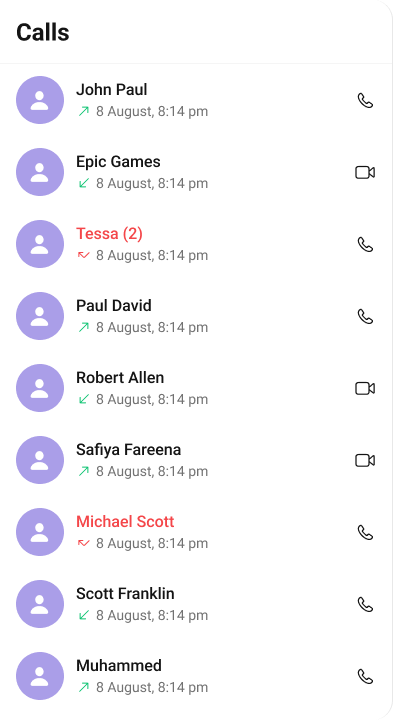 The `Call Logs` component is composed of the following BaseComponents:
| Components | Description |
| ------------------------------------------ | ---------------------------------------------------------------------------------------------------------------------------------------------------------------------------------------- |
| [CometChatListBase](/ui-kit/ios/list-base) | `CometChatListBase` is a container component featuring a title, customizable background options, and a dedicated list view for seamless integration within your application's interface. |
| [CometChatListItem](/ui-kit/ios/list-item) | This component displays data retrieved from a CallLog object on a card, presenting a title and subtitle. |
***
## Usage
### Integration
`CometChatCallLogs` being a custom **view controller**, offers versatility in its integration. It can be seamlessly launched via button clicks or any user-triggered action, enhancing the overall user experience and facilitating smoother interactions within the application.
```swift theme={null}
// To navigate to the CometChatCallLogs
let callLogs = CometChatCallLogs()
self.navigationController?.pushViewController(callLogs, animated: true)
```
### Actions
[Actions](/ui-kit/ios/components-overview#actions) dictate how a component functions. They are divided into two types: Predefined and User-defined. You can override either type, allowing you to tailor the behavior of the component to fit your specific needs.
1. ##### set(onItemClick:)
`set(OnItemClick:)` is triggered when you click on a ListItem of the Conversations component. This `set(OnItemClick:)` method proves beneficial when a user intends to customize the on-click behavior in CometChatCallLogs.
```swift theme={null}
// syntax for set(onItemClick: @escaping ((_ callLog: CometChatCallsSDK.CallLog, _ indexPath: IndexPath) -> Void))
cometChatCallLogs.set(onItemClick: { callLogs, indexPath in
// Override on item click
})
```
***
2. ##### set(OnItemLongClick:)
`set(OnItemLongClick:)` is triggered when you long press on a ListItem of the Call logs component. This `set(OnItemLongClick:)` method proves beneficial when a user intends to additional functionality on long press on list item in CometChatCallLogs.
```swift theme={null}
// syntax for set(onItemLongClick: @escaping ((_ callLog: CometChatCallsSDK.CallLog, _ indexPath: IndexPath) -> Void))
cometChatCallLogs.set(onItemLongClick: { callLog, indexPath in
// Override on item click
})
```
***
##### 3. set(onBack:)
This `set(onBack:)` method becomes valuable when a user needs to override the action triggered upon pressing the back button in CometChatCallLogs.
```swift theme={null}
cometChatCallLogs.set(onBack: {
// Override on back
})
```
***
##### 4. set(onError:)
This method proves helpful when a user needs to customize the action taken upon encountering an error in CometChatCallLogs.
```swift theme={null}
cometChatCallLogs.set(onError: { error in
// Override on error
})
```
***
##### 5. set(onEmpty:)
This `set(onEmpty:)` method is triggered when the call logs list is empty in CometChatCallLogs.
```swift theme={null}
cometChatCallLogs.set(onEmpty: {
})
```
***
##### 6. setOnLoad
This set(onLoad:) method is triggered when call logs are successfully loaded in CometChatCallLogs.
```swift theme={null}
cometChatCallLogs.set(onLoad: { callLogs in
})
```
***
### Filters
**Filters** allow you to customize the data displayed in a list within a Component. You can filter the list based on your specific criteria, allowing for a more customized. Filters can be applied using RequestBuilders of Chat SDK.
##### 1. CallRequestBuilder
The [callRequestBuilder](/sdk/ios/call-logs) enables you to filter and customize the call list based on available parameters in callRequestBuilder. This feature allows you to create more specific and targeted queries during the call. The following are the parameters available in [callRequestBuilder](/sdk/ios/call-logs)
| Method | Description | Code |
| ----------------- | --------------------------------------------------- | ------------------------------------------------------------------------------------------------------------------------- |
| **fetchPrevious** | Fetches previous call logs | `fetchPrevious(authToken: String, onSuccess: (([CallLog]) -> Void), onError: (_ error: CometChatCallException?) -> Void)` |
| **fetchNext** | Fetches next call logs | `fetchNext(onSuccess: (([CallLog]) -> Void), onError: (_ error: CometChatCallException?) -> Void)` |
| **limit** | Sets the limit for the call logs request | `.set(limit: Int)` |
| **callType** | Sets the call type for the call logs request | `.set(callType: CallType)` |
| **callStatus** | Sets the call status for the call logs request | `.set(callStatus: CallStatus)` |
| **hasRecording** | Sets the recording status for the call logs request | `.set(hasRecording: Bool)` |
| **callDirection** | Sets the call direction for the call logs request | `.set(callDirection: CallDirection)` |
| **uid** | Sets the user ID for the call logs request | `.set(uid: String)` |
| **guid** | Sets the group ID for the call logs request | `.set(guid: String)` |
| **authToken** | Sets the auth token for the call logs request | `.set(authToken: String?)` |
| **build** | Builds the call logs request | `.build()` |
**Example**
In the example below, we are applying a filter based on limit , calltype and call status.
```swift theme={null}
let callRequestBuilder = CallLogsRequest.CallLogsBuilder()
.set(limit: 2)
.set(callType: .audio)
.set(callStatus: .initiated)
// To navigate to the CometChatCallLogs
let callLogs = CometChatCallLogs()
.set(callRequestBuilder: callRequestBuilder)
self.navigationController?.pushViewController(callLogs, animated: true)
```
***
### Events
[Events](/ui-kit/ios/components-overview#events) are emitted by a `Component`. By using event you can extend existing functionality. Being global events, they can be applied in Multiple Locations and are capable of being Added or Removed.
The `Call Logs` component does not have any exposed events.
***
## Customization
To fit your app's design requirements, you can customize the appearance of the conversation component. We provide exposed methods that allow you to modify the experience and behavior according to your specific needs.
### Style
Using Style you can customize the look and feel of the component in your app, These parameters typically control elements such as the color, size, shape, and fonts used within the component.
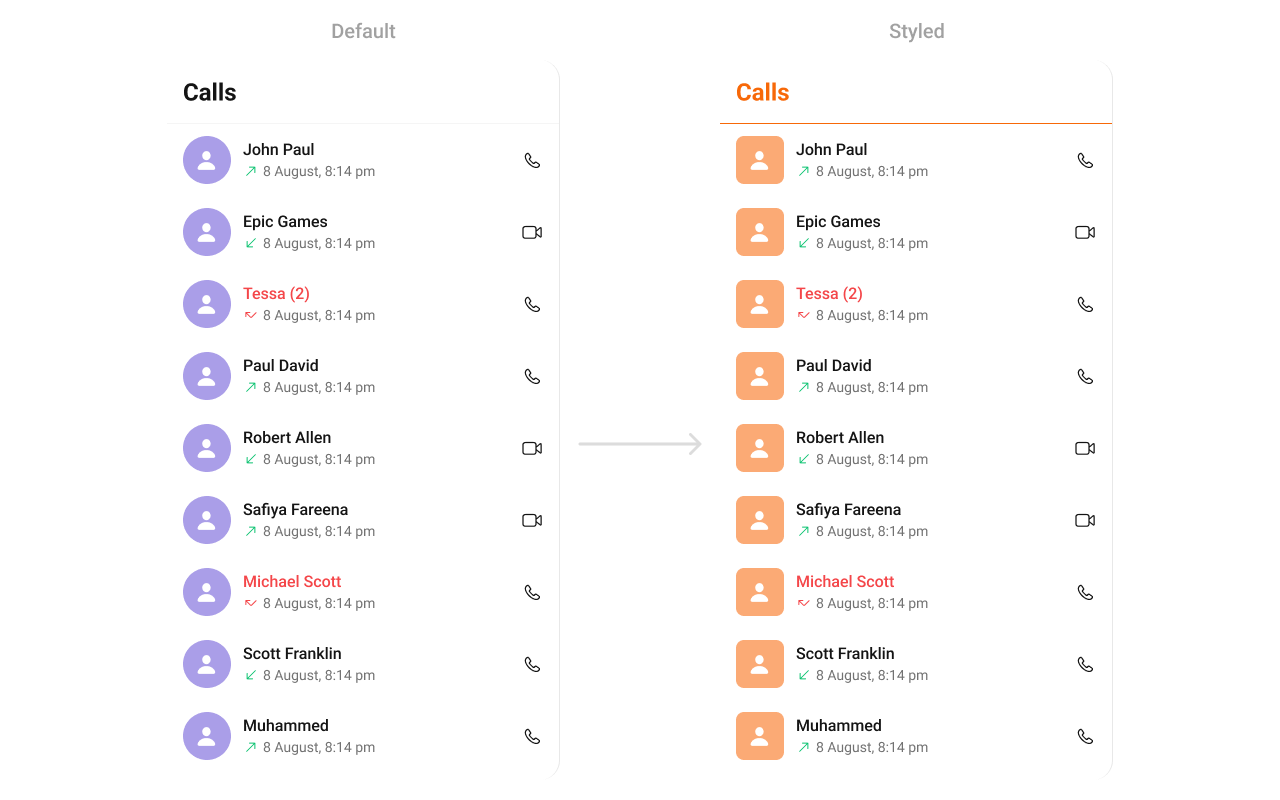
##### 1. CallLog Style
You can customize the appearance of the `CallLog` Component by applying the `CallLogStyle` to it using the following code snippet.
**Global level styling**
```swift theme={null}
let customAvatarStyle = AvatarStyle()
customAvatarStyle.backgroundColor = UIColor(hex: "#FBAA75")
customAvatarStyle.cornerRadius = CometChatCornerStyle(cornerRadius: 8)
CometChatCallLogs.style.titleColor = UIColor(hex: "#F76808")
CometChatCallLogs.style.titleFont = UIFont(name: "Times-New-Roman", size: 34)
CometChatCallLogs.avatarStyle = customAvatarStyle
```
**Instance level styling**
```swift theme={null}
let customAvatarStyle = AvatarStyle()
customAvatarStyle.backgroundColor = UIColor(hex: "#FBAA75")
customAvatarStyle.cornerRadius = CometChatCornerStyle(cornerRadius: 20)
let callLogStyle = CallLogStyle()
callLogStyle.titleColor = UIColor(hex: "#F76808")
callLogStyle.titleFont = UIFont(name: "Times-New-Roman", size: 34)
let callLog = CometChatCallLogs()
callLog.style = callLogStyle
callLog.avatarStyle = customAvatarStyle
```
The `Call Logs` component is composed of the following BaseComponents:
| Components | Description |
| ------------------------------------------ | ---------------------------------------------------------------------------------------------------------------------------------------------------------------------------------------- |
| [CometChatListBase](/ui-kit/ios/list-base) | `CometChatListBase` is a container component featuring a title, customizable background options, and a dedicated list view for seamless integration within your application's interface. |
| [CometChatListItem](/ui-kit/ios/list-item) | This component displays data retrieved from a CallLog object on a card, presenting a title and subtitle. |
***
## Usage
### Integration
`CometChatCallLogs` being a custom **view controller**, offers versatility in its integration. It can be seamlessly launched via button clicks or any user-triggered action, enhancing the overall user experience and facilitating smoother interactions within the application.
```swift theme={null}
// To navigate to the CometChatCallLogs
let callLogs = CometChatCallLogs()
self.navigationController?.pushViewController(callLogs, animated: true)
```
### Actions
[Actions](/ui-kit/ios/components-overview#actions) dictate how a component functions. They are divided into two types: Predefined and User-defined. You can override either type, allowing you to tailor the behavior of the component to fit your specific needs.
1. ##### set(onItemClick:)
`set(OnItemClick:)` is triggered when you click on a ListItem of the Conversations component. This `set(OnItemClick:)` method proves beneficial when a user intends to customize the on-click behavior in CometChatCallLogs.
```swift theme={null}
// syntax for set(onItemClick: @escaping ((_ callLog: CometChatCallsSDK.CallLog, _ indexPath: IndexPath) -> Void))
cometChatCallLogs.set(onItemClick: { callLogs, indexPath in
// Override on item click
})
```
***
2. ##### set(OnItemLongClick:)
`set(OnItemLongClick:)` is triggered when you long press on a ListItem of the Call logs component. This `set(OnItemLongClick:)` method proves beneficial when a user intends to additional functionality on long press on list item in CometChatCallLogs.
```swift theme={null}
// syntax for set(onItemLongClick: @escaping ((_ callLog: CometChatCallsSDK.CallLog, _ indexPath: IndexPath) -> Void))
cometChatCallLogs.set(onItemLongClick: { callLog, indexPath in
// Override on item click
})
```
***
##### 3. set(onBack:)
This `set(onBack:)` method becomes valuable when a user needs to override the action triggered upon pressing the back button in CometChatCallLogs.
```swift theme={null}
cometChatCallLogs.set(onBack: {
// Override on back
})
```
***
##### 4. set(onError:)
This method proves helpful when a user needs to customize the action taken upon encountering an error in CometChatCallLogs.
```swift theme={null}
cometChatCallLogs.set(onError: { error in
// Override on error
})
```
***
##### 5. set(onEmpty:)
This `set(onEmpty:)` method is triggered when the call logs list is empty in CometChatCallLogs.
```swift theme={null}
cometChatCallLogs.set(onEmpty: {
})
```
***
##### 6. setOnLoad
This set(onLoad:) method is triggered when call logs are successfully loaded in CometChatCallLogs.
```swift theme={null}
cometChatCallLogs.set(onLoad: { callLogs in
})
```
***
### Filters
**Filters** allow you to customize the data displayed in a list within a Component. You can filter the list based on your specific criteria, allowing for a more customized. Filters can be applied using RequestBuilders of Chat SDK.
##### 1. CallRequestBuilder
The [callRequestBuilder](/sdk/ios/call-logs) enables you to filter and customize the call list based on available parameters in callRequestBuilder. This feature allows you to create more specific and targeted queries during the call. The following are the parameters available in [callRequestBuilder](/sdk/ios/call-logs)
| Method | Description | Code |
| ----------------- | --------------------------------------------------- | ------------------------------------------------------------------------------------------------------------------------- |
| **fetchPrevious** | Fetches previous call logs | `fetchPrevious(authToken: String, onSuccess: (([CallLog]) -> Void), onError: (_ error: CometChatCallException?) -> Void)` |
| **fetchNext** | Fetches next call logs | `fetchNext(onSuccess: (([CallLog]) -> Void), onError: (_ error: CometChatCallException?) -> Void)` |
| **limit** | Sets the limit for the call logs request | `.set(limit: Int)` |
| **callType** | Sets the call type for the call logs request | `.set(callType: CallType)` |
| **callStatus** | Sets the call status for the call logs request | `.set(callStatus: CallStatus)` |
| **hasRecording** | Sets the recording status for the call logs request | `.set(hasRecording: Bool)` |
| **callDirection** | Sets the call direction for the call logs request | `.set(callDirection: CallDirection)` |
| **uid** | Sets the user ID for the call logs request | `.set(uid: String)` |
| **guid** | Sets the group ID for the call logs request | `.set(guid: String)` |
| **authToken** | Sets the auth token for the call logs request | `.set(authToken: String?)` |
| **build** | Builds the call logs request | `.build()` |
**Example**
In the example below, we are applying a filter based on limit , calltype and call status.
```swift theme={null}
let callRequestBuilder = CallLogsRequest.CallLogsBuilder()
.set(limit: 2)
.set(callType: .audio)
.set(callStatus: .initiated)
// To navigate to the CometChatCallLogs
let callLogs = CometChatCallLogs()
.set(callRequestBuilder: callRequestBuilder)
self.navigationController?.pushViewController(callLogs, animated: true)
```
***
### Events
[Events](/ui-kit/ios/components-overview#events) are emitted by a `Component`. By using event you can extend existing functionality. Being global events, they can be applied in Multiple Locations and are capable of being Added or Removed.
The `Call Logs` component does not have any exposed events.
***
## Customization
To fit your app's design requirements, you can customize the appearance of the conversation component. We provide exposed methods that allow you to modify the experience and behavior according to your specific needs.
### Style
Using Style you can customize the look and feel of the component in your app, These parameters typically control elements such as the color, size, shape, and fonts used within the component.
##### 1. CallLog Style
You can customize the appearance of the `CallLog` Component by applying the `CallLogStyle` to it using the following code snippet.
**Global level styling**
```swift theme={null}
let customAvatarStyle = AvatarStyle()
customAvatarStyle.backgroundColor = UIColor(hex: "#FBAA75")
customAvatarStyle.cornerRadius = CometChatCornerStyle(cornerRadius: 8)
CometChatCallLogs.style.titleColor = UIColor(hex: "#F76808")
CometChatCallLogs.style.titleFont = UIFont(name: "Times-New-Roman", size: 34)
CometChatCallLogs.avatarStyle = customAvatarStyle
```
**Instance level styling**
```swift theme={null}
let customAvatarStyle = AvatarStyle()
customAvatarStyle.backgroundColor = UIColor(hex: "#FBAA75")
customAvatarStyle.cornerRadius = CometChatCornerStyle(cornerRadius: 20)
let callLogStyle = CallLogStyle()
callLogStyle.titleColor = UIColor(hex: "#F76808")
callLogStyle.titleFont = UIFont(name: "Times-New-Roman", size: 34)
let callLog = CometChatCallLogs()
callLog.style = callLogStyle
callLog.avatarStyle = customAvatarStyle
```
 List of properties exposed by CallLogStyle
| **Property** | **Default Value** | **Description** |
| ----------------------------- | ------------------------------------- | -------------------------------------------- |
| **List Item Styles** | | |
| `listItemTitleTextColor` | `CometChatTheme.textColorPrimary` | Text color for the list item title. |
| `listItemTitleFont` | `CometChatTypography.Heading4.medium` | Font for the list item title. |
| `listItemSubTitleTextColor` | `CometChatTheme.textColorSecondary` | Text color for the list item subtitle. |
| `listItemSubTitleFont` | `CometChatTypography.Body.regular` | Font for the list item subtitle. |
| `listItemBackground` | `CometChatTheme.backgroundColor01` | Background color for the list item. |
| `listItemSelectedBackground` | `CometChatTheme.backgroundColor01` | Background color for the selected list item. |
| `listItemBorderWidth` | `0` | Border width for the list item. |
| `listItemBorderColor` | `CometChatTheme.borderColorLight` | Border color for the list item. |
| `listItemCornerRadius` | `.init(cornerRadius: 0)` | Corner radius for the list item. |
| `listItemSelectionImageTint` | `.clear` | Tint color for the selection image. |
| `listItemDeSelectedImageTint` | `.clear` | Tint color for the deselected image. |
| `listItemSelectedImage` | `UIImage()` | Image for the selected list item. |
| `listItemDeSelectedImage` | `UIImage()` | Image for the deselected list item. |
| **Background Styles** | | |
| `backgroundColor` | `CometChatTheme.backgroundColor01` | Background color. |
| `borderWidth` | `0` | Border width. |
| `borderColor` | `CometChatTheme.borderColorLight` | Border color. |
| `cornerRadius` | `.init(cornerRadius: 0)` | Corner radius. |
| **Title Styles** | | |
| `titleColor` | `CometChatTheme.textColorPrimary` | Text color for the title. |
| `titleFont` | `CometChatTypography.Heading4.bold` | Font for the title. |
| `largeTitleColor` | `CometChatTheme.textColorPrimary` | Text color for large titles. |
| `largeTitleFont` | `nil` | Font for large titles. |
| **Navigation Bar Styles** | | |
| `navigationBarTintColor` | `CometChatTheme.backgroundColor01` | Background color for the navigation bar. |
| `navigationBarItemsTintColor` | `CometChatTheme.iconColorPrimary` | Tint color for navigation bar items. |
| **Error Message Styles** | | |
| `errorTitleTextFont` | `CometChatTypography.Heading4.bold` | Font for the error title. |
| `errorTitleTextColor` | `CometChatTheme.textColorPrimary` | Text color for the error title. |
| `errorSubTitleFont` | `CometChatTypography.Body.regular` | Font for the error subtitle. |
| `errorSubTitleTextColor` | `CometChatTheme.textColorSecondary` | Text color for the error subtitle. |
| **Retry Button Styles** | | |
| `retryButtonTextColor` | `CometChatTheme.white` | Text color for the retry button. |
| `retryButtonTextFont` | `CometChatTypography.Button.medium` | Font for the retry button text. |
| `retryButtonBackgroundColor` | `CometChatTheme.primaryColor` | Background color for the retry button. |
| `retryButtonBorderColor` | `.clear` | Border color for the retry button. |
| `retryButtonBorderWidth` | `0` | Border width for the retry button. |
| `retryButtonCornerRadius` | `.init(cornerRadius: 0)` | Corner radius for the retry button. |
| **Empty State Styles** | | |
| `emptyTitleTextFont` | `CometChatTypography.Heading4.bold` | Font for the empty state title. |
| `emptyTitleTextColor` | `CometChatTheme.textColorPrimary` | Text color for the empty state title. |
| `emptySubTitleFont` | `CometChatTypography.Body.regular` | Font for the empty state subtitle. |
| `emptySubTitleTextColor` | `CometChatTheme.textColorSecondary` | Text color for the empty state subtitle. |
| **TableView Styles** | | |
| `tableViewSeparator` | `.clear` | Color for the table view separator. |
| **Icon Styles** | | |
| `backIcon` | `nil` | Icon for the back button. |
| `backIconTint` | `CometChatTheme.iconColorPrimary` | Tint color for the back icon. |
| `incomingCallIcon` | System icon for "arrow\.down.left" | Icon for incoming calls. |
| `incomingCallIconTint` | `CometChatTheme.errorColor` | Tint color for the incoming call icon. |
| `outgoingCallIcon` | System icon for "arrow\.up.right" | Icon for outgoing calls. |
| `outgoingCallIconTint` | `CometChatTheme.successColor` | Tint color for the outgoing call icon. |
| `missedCallTitleColor` | `CometChatTheme.errorColor` | Text color for missed call titles. |
| `missedCallIcon` | `nil` | Icon for missed calls. |
| `missedCallIconTint` | `CometChatTheme.errorColor` | Tint color for the missed call icon. |
| `audioCallIcon` | System icon for "phone" | Icon for audio calls. |
| `audioCallIconTint` | `CometChatTheme.iconColorPrimary` | Tint color for the audio call icon. |
| `videoCallIcon` | System icon for "video" | Icon for video calls. |
| `videoCallIconTint` | `CometChatTheme.iconColorPrimary` | Tint color for the video call icon. |
| `separatorColor` | `.clear` | Color for separators. |
***
### Functionality
These are a set of small functional customizations that allow you to fine-tune the overall experience of the component. With these, you can change text, set custom icons, and toggle the visibility of UI elements.
Below is a list of customizations along with corresponding code snippets
| Property | Description | Code |
| ------------------ | -------------------------------------------------- | ------------------------------- |
| callRequestBuilder | Sets the `CallLogsBuilder` instance for call logs. | `.set(callRequestBuilder: Any)` |
| hideError | Hides the error state view. | `hideError = true` |
| hideNavigationBar | Hides the navigation bar. | `hideNavigationBar = true` |
| hideLoadingState | Hides the loading state view. | `hideLoadingState = true` |
| hideBackIcon | Hides the back icon in the navigation bar. | `hideBackIcon = true` |
***
### Advance
For advanced-level customization, you can set custom views to the component. This lets you tailor each aspect of the component to fit your exact needs and application aesthetics. You can create and define your views, layouts, and UI elements and then incorporate those into the component.
#### Date Time Formatter
The **CometChatCallLogs** component supports full customization of how date and time are displayed using the [CometChatDateTimeFormatter](/ui-kit/ios/localize#datetimeformatter).
This enables developers to localize, format, or personalize the date and time strings shown next to each call log such as “Today”, “Yesterday”, “12:45 PM”, etc.
1. Component-Level (Global)
```swift theme={null}
CometChatCallLogs.dateTimeFormatter.time = { timestamp in
return "at " + DateFormatter.localizedString(from: Date(timeIntervalSince1970: TimeInterval(timestamp)), dateStyle: .none, timeStyle: .short)
}
CometChatCallLogs.dateTimeFormatter.today = { timestamp in
return "Today • \(formattedTime(from: timestamp))"
}
CometChatCallLogs.dateTimeFormatter.otherDay = { timestamp in // This will display older dates as "24 Apr 2025" instead of the default relative format.
let formatter = DateFormatter()
formatter.dateFormat = "dd MMM yyyy"
return formatter.string(from: Date(timeIntervalSince1970: TimeInterval(timestamp)))
}
```
2. Instance-Level (Local)
```swift theme={null}
let callLogs = CometChatCallLogs()
callLogs.dateTimeFormatter.yesterday = { timestamp in
return "Yesterday at " + formattedTime(from: timestamp)
}
```
##### Available closures
| Property | Description | Code |
| --------- | ------------------------------------------------------------------- | --------------------------------------------------------- |
| time | Called to format a timestamp as a standard time (e.g., "12:30 PM"). | `CometChatCallLogs.dateTimeFormatter.time = { ... }` |
| today | Called when rendering messages sent today. | `CometChatCallLogs.dateTimeFormatter.today = { ... }` |
| yesterday | Called for yesterday's messages. | `CometChatCallLogs.dateTimeFormatter.yesterday = { ... }` |
| lastweek | Called for messages within the last week. | `CometChatCallLogs.dateTimeFormatter.lastweek = { ... }` |
| otherDay | Called for dates older than last week. | `CometChatCallLogs.dateTimeFormatter.otherDay = { ... }` |
| minute | Called when referring to "a minute ago". | `CometChatCallLogs.dateTimeFormatter.minute = { ... }` |
| minutes | Called for "x minutes ago". | `CometChatCallLogs.dateTimeFormatter.minutes = { ... }` |
| hour | Called for "an hour ago". | `CometChatCallLogs.dateTimeFormatter.hour = { ... }` |
| hours | Called for "x hours ago". | `CometChatCallLogs.dateTimeFormatter.hours = { ... }` |
Each closure receives a timestamp (Int, representing UNIX time) and must return a String representing the formatted time.
***
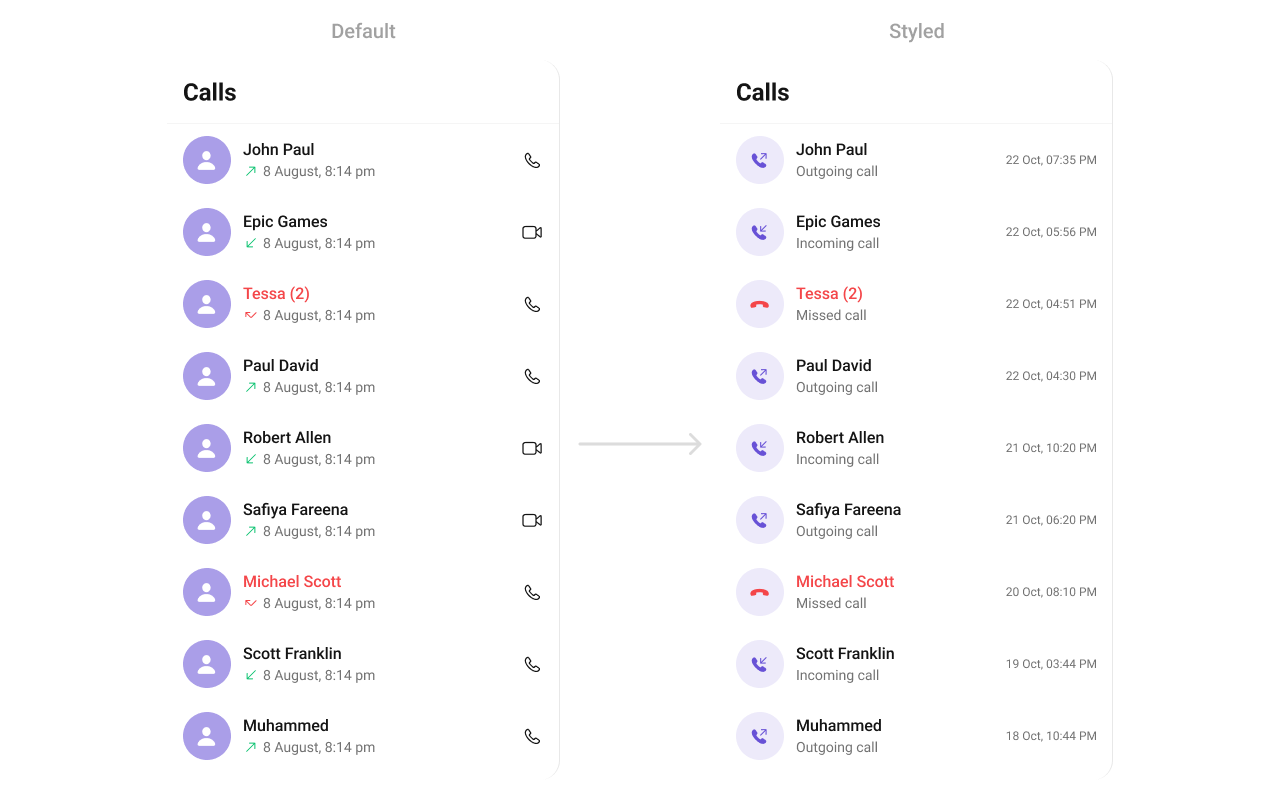
#### SetListItemView
With this function, you can assign a custom ListItem to the CallLogs Component.
```swift theme={null}
let callLogs = CometChatCallLogs()
callLogs.set(listItemView: { callLog in
let view = CustomListItem()
return view
})
```
List of properties exposed by CallLogStyle
| **Property** | **Default Value** | **Description** |
| ----------------------------- | ------------------------------------- | -------------------------------------------- |
| **List Item Styles** | | |
| `listItemTitleTextColor` | `CometChatTheme.textColorPrimary` | Text color for the list item title. |
| `listItemTitleFont` | `CometChatTypography.Heading4.medium` | Font for the list item title. |
| `listItemSubTitleTextColor` | `CometChatTheme.textColorSecondary` | Text color for the list item subtitle. |
| `listItemSubTitleFont` | `CometChatTypography.Body.regular` | Font for the list item subtitle. |
| `listItemBackground` | `CometChatTheme.backgroundColor01` | Background color for the list item. |
| `listItemSelectedBackground` | `CometChatTheme.backgroundColor01` | Background color for the selected list item. |
| `listItemBorderWidth` | `0` | Border width for the list item. |
| `listItemBorderColor` | `CometChatTheme.borderColorLight` | Border color for the list item. |
| `listItemCornerRadius` | `.init(cornerRadius: 0)` | Corner radius for the list item. |
| `listItemSelectionImageTint` | `.clear` | Tint color for the selection image. |
| `listItemDeSelectedImageTint` | `.clear` | Tint color for the deselected image. |
| `listItemSelectedImage` | `UIImage()` | Image for the selected list item. |
| `listItemDeSelectedImage` | `UIImage()` | Image for the deselected list item. |
| **Background Styles** | | |
| `backgroundColor` | `CometChatTheme.backgroundColor01` | Background color. |
| `borderWidth` | `0` | Border width. |
| `borderColor` | `CometChatTheme.borderColorLight` | Border color. |
| `cornerRadius` | `.init(cornerRadius: 0)` | Corner radius. |
| **Title Styles** | | |
| `titleColor` | `CometChatTheme.textColorPrimary` | Text color for the title. |
| `titleFont` | `CometChatTypography.Heading4.bold` | Font for the title. |
| `largeTitleColor` | `CometChatTheme.textColorPrimary` | Text color for large titles. |
| `largeTitleFont` | `nil` | Font for large titles. |
| **Navigation Bar Styles** | | |
| `navigationBarTintColor` | `CometChatTheme.backgroundColor01` | Background color for the navigation bar. |
| `navigationBarItemsTintColor` | `CometChatTheme.iconColorPrimary` | Tint color for navigation bar items. |
| **Error Message Styles** | | |
| `errorTitleTextFont` | `CometChatTypography.Heading4.bold` | Font for the error title. |
| `errorTitleTextColor` | `CometChatTheme.textColorPrimary` | Text color for the error title. |
| `errorSubTitleFont` | `CometChatTypography.Body.regular` | Font for the error subtitle. |
| `errorSubTitleTextColor` | `CometChatTheme.textColorSecondary` | Text color for the error subtitle. |
| **Retry Button Styles** | | |
| `retryButtonTextColor` | `CometChatTheme.white` | Text color for the retry button. |
| `retryButtonTextFont` | `CometChatTypography.Button.medium` | Font for the retry button text. |
| `retryButtonBackgroundColor` | `CometChatTheme.primaryColor` | Background color for the retry button. |
| `retryButtonBorderColor` | `.clear` | Border color for the retry button. |
| `retryButtonBorderWidth` | `0` | Border width for the retry button. |
| `retryButtonCornerRadius` | `.init(cornerRadius: 0)` | Corner radius for the retry button. |
| **Empty State Styles** | | |
| `emptyTitleTextFont` | `CometChatTypography.Heading4.bold` | Font for the empty state title. |
| `emptyTitleTextColor` | `CometChatTheme.textColorPrimary` | Text color for the empty state title. |
| `emptySubTitleFont` | `CometChatTypography.Body.regular` | Font for the empty state subtitle. |
| `emptySubTitleTextColor` | `CometChatTheme.textColorSecondary` | Text color for the empty state subtitle. |
| **TableView Styles** | | |
| `tableViewSeparator` | `.clear` | Color for the table view separator. |
| **Icon Styles** | | |
| `backIcon` | `nil` | Icon for the back button. |
| `backIconTint` | `CometChatTheme.iconColorPrimary` | Tint color for the back icon. |
| `incomingCallIcon` | System icon for "arrow\.down.left" | Icon for incoming calls. |
| `incomingCallIconTint` | `CometChatTheme.errorColor` | Tint color for the incoming call icon. |
| `outgoingCallIcon` | System icon for "arrow\.up.right" | Icon for outgoing calls. |
| `outgoingCallIconTint` | `CometChatTheme.successColor` | Tint color for the outgoing call icon. |
| `missedCallTitleColor` | `CometChatTheme.errorColor` | Text color for missed call titles. |
| `missedCallIcon` | `nil` | Icon for missed calls. |
| `missedCallIconTint` | `CometChatTheme.errorColor` | Tint color for the missed call icon. |
| `audioCallIcon` | System icon for "phone" | Icon for audio calls. |
| `audioCallIconTint` | `CometChatTheme.iconColorPrimary` | Tint color for the audio call icon. |
| `videoCallIcon` | System icon for "video" | Icon for video calls. |
| `videoCallIconTint` | `CometChatTheme.iconColorPrimary` | Tint color for the video call icon. |
| `separatorColor` | `.clear` | Color for separators. |
***
### Functionality
These are a set of small functional customizations that allow you to fine-tune the overall experience of the component. With these, you can change text, set custom icons, and toggle the visibility of UI elements.
Below is a list of customizations along with corresponding code snippets
| Property | Description | Code |
| ------------------ | -------------------------------------------------- | ------------------------------- |
| callRequestBuilder | Sets the `CallLogsBuilder` instance for call logs. | `.set(callRequestBuilder: Any)` |
| hideError | Hides the error state view. | `hideError = true` |
| hideNavigationBar | Hides the navigation bar. | `hideNavigationBar = true` |
| hideLoadingState | Hides the loading state view. | `hideLoadingState = true` |
| hideBackIcon | Hides the back icon in the navigation bar. | `hideBackIcon = true` |
***
### Advance
For advanced-level customization, you can set custom views to the component. This lets you tailor each aspect of the component to fit your exact needs and application aesthetics. You can create and define your views, layouts, and UI elements and then incorporate those into the component.
#### Date Time Formatter
The **CometChatCallLogs** component supports full customization of how date and time are displayed using the [CometChatDateTimeFormatter](/ui-kit/ios/localize#datetimeformatter).
This enables developers to localize, format, or personalize the date and time strings shown next to each call log such as “Today”, “Yesterday”, “12:45 PM”, etc.
1. Component-Level (Global)
```swift theme={null}
CometChatCallLogs.dateTimeFormatter.time = { timestamp in
return "at " + DateFormatter.localizedString(from: Date(timeIntervalSince1970: TimeInterval(timestamp)), dateStyle: .none, timeStyle: .short)
}
CometChatCallLogs.dateTimeFormatter.today = { timestamp in
return "Today • \(formattedTime(from: timestamp))"
}
CometChatCallLogs.dateTimeFormatter.otherDay = { timestamp in // This will display older dates as "24 Apr 2025" instead of the default relative format.
let formatter = DateFormatter()
formatter.dateFormat = "dd MMM yyyy"
return formatter.string(from: Date(timeIntervalSince1970: TimeInterval(timestamp)))
}
```
2. Instance-Level (Local)
```swift theme={null}
let callLogs = CometChatCallLogs()
callLogs.dateTimeFormatter.yesterday = { timestamp in
return "Yesterday at " + formattedTime(from: timestamp)
}
```
##### Available closures
| Property | Description | Code |
| --------- | ------------------------------------------------------------------- | --------------------------------------------------------- |
| time | Called to format a timestamp as a standard time (e.g., "12:30 PM"). | `CometChatCallLogs.dateTimeFormatter.time = { ... }` |
| today | Called when rendering messages sent today. | `CometChatCallLogs.dateTimeFormatter.today = { ... }` |
| yesterday | Called for yesterday's messages. | `CometChatCallLogs.dateTimeFormatter.yesterday = { ... }` |
| lastweek | Called for messages within the last week. | `CometChatCallLogs.dateTimeFormatter.lastweek = { ... }` |
| otherDay | Called for dates older than last week. | `CometChatCallLogs.dateTimeFormatter.otherDay = { ... }` |
| minute | Called when referring to "a minute ago". | `CometChatCallLogs.dateTimeFormatter.minute = { ... }` |
| minutes | Called for "x minutes ago". | `CometChatCallLogs.dateTimeFormatter.minutes = { ... }` |
| hour | Called for "an hour ago". | `CometChatCallLogs.dateTimeFormatter.hour = { ... }` |
| hours | Called for "x hours ago". | `CometChatCallLogs.dateTimeFormatter.hours = { ... }` |
Each closure receives a timestamp (Int, representing UNIX time) and must return a String representing the formatted time.
***
#### SetListItemView
With this function, you can assign a custom ListItem to the CallLogs Component.
```swift theme={null}
let callLogs = CometChatCallLogs()
callLogs.set(listItemView: { callLog in
let view = CustomListItem()
return view
})
```
 ```swift theme={null}
import UIKit
import CometChatUIKitSwift
import CometChatCallsSDK
class CustomListItem: UIView {
// Initialize UI components
public var callImage: UIImageView = {
let imageView = UIImageView()
imageView.translatesAutoresizingMaskIntoConstraints = false
return imageView
}()
public var nameLabel: UILabel = {
let label = UILabel()
label.translatesAutoresizingMaskIntoConstraints = false
return label
}()
public var subTitleLabel: UILabel = {
let label = UILabel()
label.translatesAutoresizingMaskIntoConstraints = false
label.textAlignment = .center
label.textColor = .lightGray
return label
}()
public var dateLabel: UILabel = {
let label = UILabel()
label.translatesAutoresizingMaskIntoConstraints = false
label.textAlignment = .center
label.textColor = .systemGray3
return label
}()
public var detailStackView: UIStackView = {
let stack = UIStackView()
stack.translatesAutoresizingMaskIntoConstraints = false
stack.alignment = .leading
stack.distribution = .fill
stack.spacing = 4
return stack
}()
override init(frame: CGRect) {
super.init(frame: frame)
setupUI()
}
required init?(coder aDecoder: NSCoder) {
fatalError("init(coder:) has not been implemented")
}
private func setupUI() {
addSubview(callImage)
addSubview(detailStackView)
detailStackView.addArrangedSubview(nameLabel)
detailStackView.addArrangedSubview(subTitleLabel)
addSubview(dateLabel)
NSLayoutConstraint.activate([
callImage.leadingAnchor.constraint(equalTo: leadingAnchor, constant: 8),
callImage.centerYAnchor.constraint(equalTo: centerYAnchor),
callImage.widthAnchor.constraint(equalToConstant: 40),
callImage.heightAnchor.constraint(equalToConstant: 40),
detailStackView.leadingAnchor.constraint(equalTo: callImage.trailingAnchor, constant: 8),
detailStackView.trailingAnchor.constraint(equalTo: dateLabel.trailingAnchor, constant: -8),
detailStackView.centerYAnchor.constraint(equalTo: callImage.centerYAnchor),
dateLabel.centerYAnchor.constraint(equalTo: callImage.centerYAnchor),
dateLabel.trailingAnchor.constraint(equalTo: trailingAnchor, constant: -12)
])
}
}
```
You can indeed create a custom listitem UIView file named `CustomListItem` for more complex or unique list items.
Afterwards, seamlessly integrate this `CustomListItem` UIView file into the `.setListItemView` method within **CometChatCallLogs()**.
***
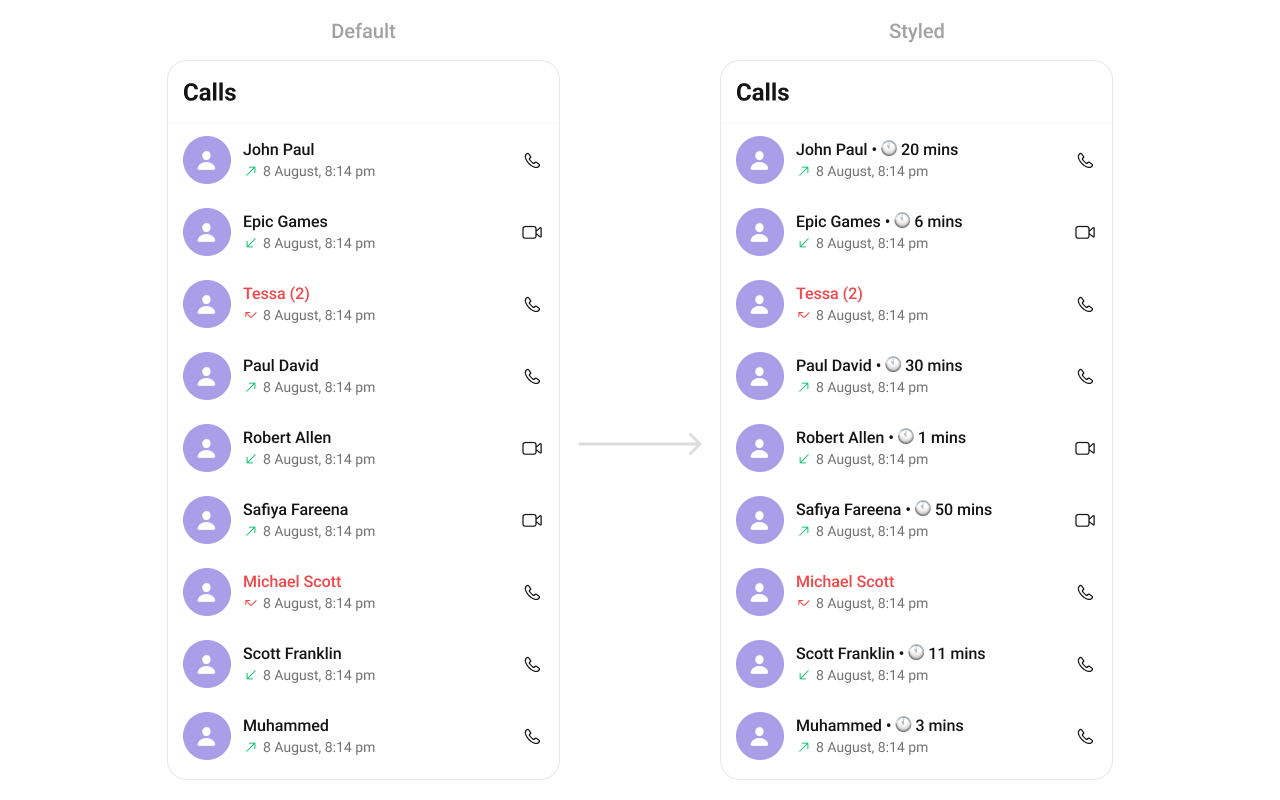
#### SetTitleView
You can create a custom Title view for more complex or unique list items and integrate this `CustomTitleView` UIView file into the `.set(titleView:)` method within **CometChatCallLogs()**.
```swift theme={null}
let callLogs = CometChatCallLogs()
callLogs.set(titleView: { callLog in
let view = CustomTitleView()
view.configure(callLog: callLog)
return view
})
```
**Example**
```swift theme={null}
import UIKit
import CometChatUIKitSwift
import CometChatCallsSDK
class CustomListItem: UIView {
// Initialize UI components
public var callImage: UIImageView = {
let imageView = UIImageView()
imageView.translatesAutoresizingMaskIntoConstraints = false
return imageView
}()
public var nameLabel: UILabel = {
let label = UILabel()
label.translatesAutoresizingMaskIntoConstraints = false
return label
}()
public var subTitleLabel: UILabel = {
let label = UILabel()
label.translatesAutoresizingMaskIntoConstraints = false
label.textAlignment = .center
label.textColor = .lightGray
return label
}()
public var dateLabel: UILabel = {
let label = UILabel()
label.translatesAutoresizingMaskIntoConstraints = false
label.textAlignment = .center
label.textColor = .systemGray3
return label
}()
public var detailStackView: UIStackView = {
let stack = UIStackView()
stack.translatesAutoresizingMaskIntoConstraints = false
stack.alignment = .leading
stack.distribution = .fill
stack.spacing = 4
return stack
}()
override init(frame: CGRect) {
super.init(frame: frame)
setupUI()
}
required init?(coder aDecoder: NSCoder) {
fatalError("init(coder:) has not been implemented")
}
private func setupUI() {
addSubview(callImage)
addSubview(detailStackView)
detailStackView.addArrangedSubview(nameLabel)
detailStackView.addArrangedSubview(subTitleLabel)
addSubview(dateLabel)
NSLayoutConstraint.activate([
callImage.leadingAnchor.constraint(equalTo: leadingAnchor, constant: 8),
callImage.centerYAnchor.constraint(equalTo: centerYAnchor),
callImage.widthAnchor.constraint(equalToConstant: 40),
callImage.heightAnchor.constraint(equalToConstant: 40),
detailStackView.leadingAnchor.constraint(equalTo: callImage.trailingAnchor, constant: 8),
detailStackView.trailingAnchor.constraint(equalTo: dateLabel.trailingAnchor, constant: -8),
detailStackView.centerYAnchor.constraint(equalTo: callImage.centerYAnchor),
dateLabel.centerYAnchor.constraint(equalTo: callImage.centerYAnchor),
dateLabel.trailingAnchor.constraint(equalTo: trailingAnchor, constant: -12)
])
}
}
```
You can indeed create a custom listitem UIView file named `CustomListItem` for more complex or unique list items.
Afterwards, seamlessly integrate this `CustomListItem` UIView file into the `.setListItemView` method within **CometChatCallLogs()**.
***
#### SetTitleView
You can create a custom Title view for more complex or unique list items and integrate this `CustomTitleView` UIView file into the `.set(titleView:)` method within **CometChatCallLogs()**.
```swift theme={null}
let callLogs = CometChatCallLogs()
callLogs.set(titleView: { callLog in
let view = CustomTitleView()
view.configure(callLog: callLog)
return view
})
```
**Example**
 ```swift theme={null}
import UIKit
import CometChatUIKitSwift
import CometChatSDK
import CometChatCallsSDK
import UIKit
class CustomTitleView: UIView {
private let nameLabel: UILabel = {
let label = UILabel()
label.font = UIFont.systemFont(ofSize: 16, weight: .semibold)
label.textColor = .black
return label
}()
private let separatorLabel: UILabel = {
let label = UILabel()
label.text = "•"
label.font = UIFont.systemFont(ofSize: 16, weight: .regular)
label.textColor = .gray
return label
}()
private let clockIcon: UIImageView = {
let imageView = UIImageView(image: UIImage(systemName: "clock.fill"))
imageView.tintColor = .gray
imageView.contentMode = .scaleAspectFit
return imageView
}()
private let timeLabel: UILabel = {
let label = UILabel()
label.font = UIFont.systemFont(ofSize: 16, weight: .regular)
label.textColor = .gray
return label
}()
private let stackView: UIStackView = {
let stackView = UIStackView()
stackView.axis = .horizontal
stackView.alignment = .center
stackView.spacing = 4
return stackView
}()
override init(frame: CGRect) {
super.init(frame: frame)
setupUI()
}
required init?(coder: NSCoder) {
fatalError("init(coder:) has not been implemented")
}
private func setupUI() {
stackView.addArrangedSubview(nameLabel)
stackView.addArrangedSubview(separatorLabel)
stackView.addArrangedSubview(clockIcon)
stackView.addArrangedSubview(timeLabel)
addSubview(stackView)
stackView.translatesAutoresizingMaskIntoConstraints = false
NSLayoutConstraint.activate([
stackView.leadingAnchor.constraint(equalTo: leadingAnchor),
stackView.topAnchor.constraint(equalTo: topAnchor),
stackView.bottomAnchor.constraint(equalTo: bottomAnchor),
stackView.trailingAnchor.constraint(equalTo: trailingAnchor)
])
}
func configure(callLog: CometChatCallsSDK.CallLog){
if let group = (callLog.receiver as? CallGroup) {
callGroup = group
} else if let initiator = (callLog.initiator as? CallUser), initiator.uid != CometChatUIKit.getLoggedInUser()?.uid {
callUser = initiator
} else if let receiver = (callLog.receiver as? CallUser) {
callUser = receiver
}
nameLabel.text = callUser?.name ?? callGroup?.name ?? ""
timeLabel.text = formatTime(seconds: (participant?.totalDurationInMinutes ?? 0.0)*60)
}
}
```
***
***
#### SetLeadingView
You can create a custom Title view for more complex or unique list items and integrate this `CustomLeadingView` UIView file into the `.set(leadingView:)` method within **CometChatCallLogs()**.
```swift theme={null}
let callLogs = CometChatCallLogs()
callLogs.set(leadingView: { callLog in
let view = CustomLeadingView()
view.configure(callLog: callLog)
return view
})
```
**Example**
```swift theme={null}
import UIKit
import CometChatUIKitSwift
import CometChatSDK
import CometChatCallsSDK
import UIKit
class CustomTitleView: UIView {
private let nameLabel: UILabel = {
let label = UILabel()
label.font = UIFont.systemFont(ofSize: 16, weight: .semibold)
label.textColor = .black
return label
}()
private let separatorLabel: UILabel = {
let label = UILabel()
label.text = "•"
label.font = UIFont.systemFont(ofSize: 16, weight: .regular)
label.textColor = .gray
return label
}()
private let clockIcon: UIImageView = {
let imageView = UIImageView(image: UIImage(systemName: "clock.fill"))
imageView.tintColor = .gray
imageView.contentMode = .scaleAspectFit
return imageView
}()
private let timeLabel: UILabel = {
let label = UILabel()
label.font = UIFont.systemFont(ofSize: 16, weight: .regular)
label.textColor = .gray
return label
}()
private let stackView: UIStackView = {
let stackView = UIStackView()
stackView.axis = .horizontal
stackView.alignment = .center
stackView.spacing = 4
return stackView
}()
override init(frame: CGRect) {
super.init(frame: frame)
setupUI()
}
required init?(coder: NSCoder) {
fatalError("init(coder:) has not been implemented")
}
private func setupUI() {
stackView.addArrangedSubview(nameLabel)
stackView.addArrangedSubview(separatorLabel)
stackView.addArrangedSubview(clockIcon)
stackView.addArrangedSubview(timeLabel)
addSubview(stackView)
stackView.translatesAutoresizingMaskIntoConstraints = false
NSLayoutConstraint.activate([
stackView.leadingAnchor.constraint(equalTo: leadingAnchor),
stackView.topAnchor.constraint(equalTo: topAnchor),
stackView.bottomAnchor.constraint(equalTo: bottomAnchor),
stackView.trailingAnchor.constraint(equalTo: trailingAnchor)
])
}
func configure(callLog: CometChatCallsSDK.CallLog){
if let group = (callLog.receiver as? CallGroup) {
callGroup = group
} else if let initiator = (callLog.initiator as? CallUser), initiator.uid != CometChatUIKit.getLoggedInUser()?.uid {
callUser = initiator
} else if let receiver = (callLog.receiver as? CallUser) {
callUser = receiver
}
nameLabel.text = callUser?.name ?? callGroup?.name ?? ""
timeLabel.text = formatTime(seconds: (participant?.totalDurationInMinutes ?? 0.0)*60)
}
}
```
***
***
#### SetLeadingView
You can create a custom Title view for more complex or unique list items and integrate this `CustomLeadingView` UIView file into the `.set(leadingView:)` method within **CometChatCallLogs()**.
```swift theme={null}
let callLogs = CometChatCallLogs()
callLogs.set(leadingView: { callLog in
let view = CustomLeadingView()
view.configure(callLog: callLog)
return view
})
```
**Example**
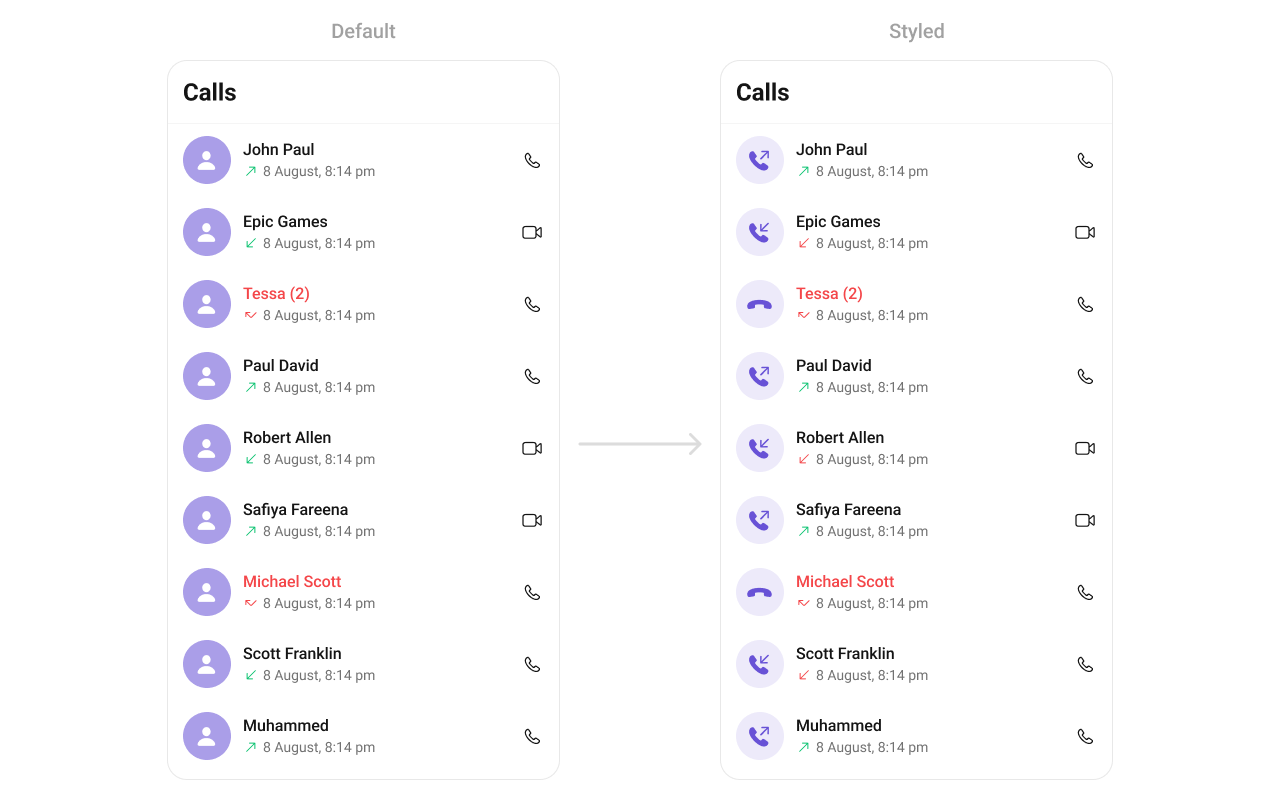 ```swift theme={null}
import UIKit
import CometChatUIKitSwift
import CometChatSDK
import CometChatCallsSDK
import UIKit
class CustomLeadingView: UIButton {
override init(frame: CGRect) {
super.init(frame: frame)
setupUI()
}
required init?(coder: NSCoder) {
fatalError("init(coder:) has not been implemented")
}
private func setupUI() {
let callIcon = UIImage(systemName: "phone.arrow.up.right")?.withRenderingMode(.alwaysTemplate)
setImage(callIcon, for: .normal)
tintColor = UIColor.purple
backgroundColor = UIColor.purple.withAlphaComponent(0.1)
layer.cornerRadius = 24 // Make it circular
clipsToBounds = true
NSLayoutConstraint.activate([
widthAnchor.constraint(equalToConstant: 48),
heightAnchor.constraint(equalToConstant: 48)
])
}
func configure(callLog: CometChatCallsSDK.CallLog){
var image = UIImage()
switch callLog?.status {
case .busy, .unanswered, .rejected, .cancelled:
image = UIImage(named: "missed_call_image")
case .initiated, .ongoing, .ended:
if isInitiator{
image = UIImage(systemName: "arrow.up.right")
}else{
image = UIImage(systemName: "arrow.down.left")
}
case .none:
break
@unknown default:
break
}
self.setImage(image, for: .normal)
}
}
```
***
#### SetSubTitleView
You can customize the subtitle view for each callLog item to meet your requirements.
You can indeed create a custom Subtitleview UIView file named `SubtitleView` for more complex or unique list items.
Afterwards, seamlessly integrate this `SubtitleView` UIView file into the `.setSubtitle` method within **CometChatCallLogs()**.
```swift theme={null}
let callLogs = CometChatCallLogs()
callLogs.set(subtitleView: { callLog in
let view = CustomSubtitleView()
return view
})
```
**Example**
```swift theme={null}
import UIKit
import CometChatUIKitSwift
import CometChatSDK
import CometChatCallsSDK
import UIKit
class CustomLeadingView: UIButton {
override init(frame: CGRect) {
super.init(frame: frame)
setupUI()
}
required init?(coder: NSCoder) {
fatalError("init(coder:) has not been implemented")
}
private func setupUI() {
let callIcon = UIImage(systemName: "phone.arrow.up.right")?.withRenderingMode(.alwaysTemplate)
setImage(callIcon, for: .normal)
tintColor = UIColor.purple
backgroundColor = UIColor.purple.withAlphaComponent(0.1)
layer.cornerRadius = 24 // Make it circular
clipsToBounds = true
NSLayoutConstraint.activate([
widthAnchor.constraint(equalToConstant: 48),
heightAnchor.constraint(equalToConstant: 48)
])
}
func configure(callLog: CometChatCallsSDK.CallLog){
var image = UIImage()
switch callLog?.status {
case .busy, .unanswered, .rejected, .cancelled:
image = UIImage(named: "missed_call_image")
case .initiated, .ongoing, .ended:
if isInitiator{
image = UIImage(systemName: "arrow.up.right")
}else{
image = UIImage(systemName: "arrow.down.left")
}
case .none:
break
@unknown default:
break
}
self.setImage(image, for: .normal)
}
}
```
***
#### SetSubTitleView
You can customize the subtitle view for each callLog item to meet your requirements.
You can indeed create a custom Subtitleview UIView file named `SubtitleView` for more complex or unique list items.
Afterwards, seamlessly integrate this `SubtitleView` UIView file into the `.setSubtitle` method within **CometChatCallLogs()**.
```swift theme={null}
let callLogs = CometChatCallLogs()
callLogs.set(subtitleView: { callLog in
let view = CustomSubtitleView()
return view
})
```
**Example**
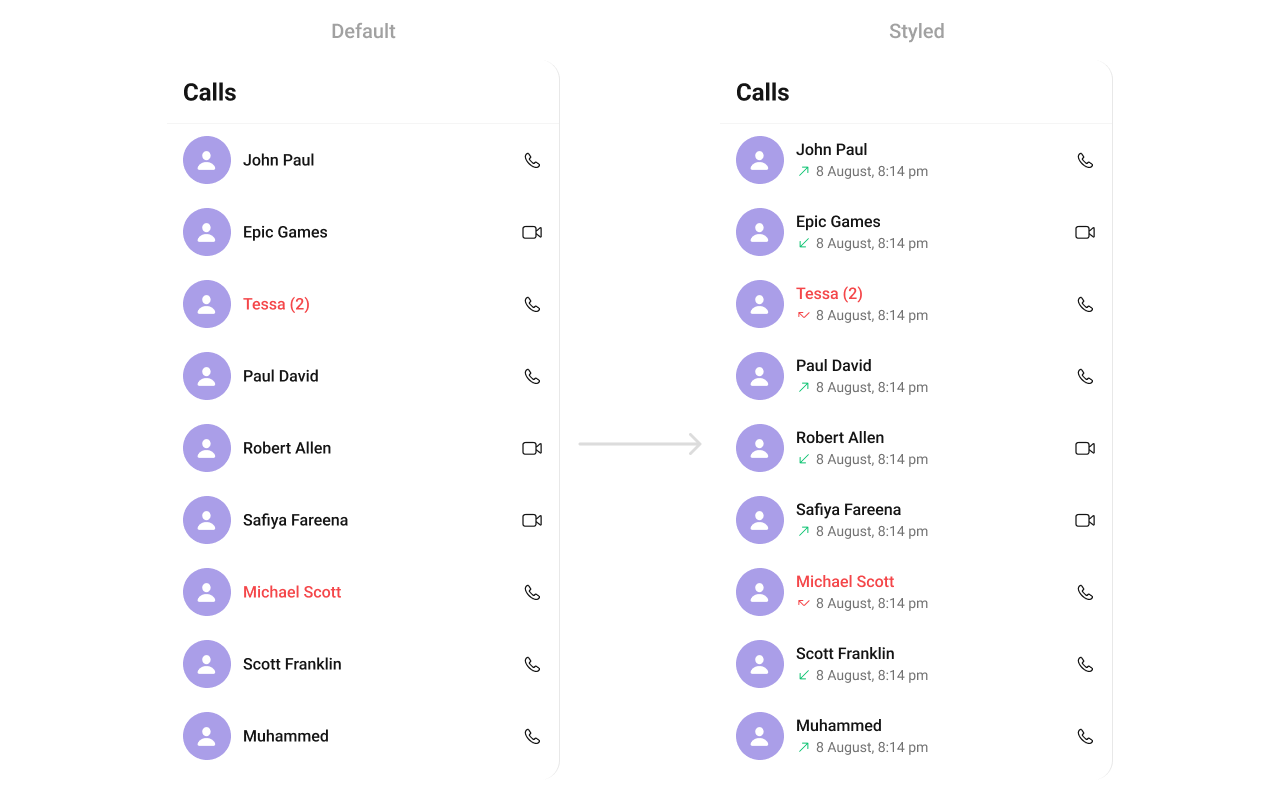 ```swift theme={null}
import UIKit
import CometChatUIKitSwift
import CometChatSDK
import CometChatCallsSDK
class CustomSubtitleView: UIView {
// MARK: - Properties
private let subtitleLabel: UILabel = {
let label = UILabel()
label.translatesAutoresizingMaskIntoConstraints = false
label.font = UIFont.systemFont(ofSize: 14, weight: .regular) // Customize font
label.textColor = .darkGray // Customize text color
label.numberOfLines = 1 // Single line
label.textAlignment = .left // Align to the left
return label
}()
// MARK: - Initializers
override init(frame: CGRect) {
super.init(frame: frame)
setupView()
}
required init?(coder: NSCoder) {
super.init(coder: coder)
setupView()
}
// MARK: - Setup
private func setupView() {
addSubview(subtitleLabel)
// Constraints
NSLayoutConstraint.activate([
subtitleLabel.leadingAnchor.constraint(equalTo: leadingAnchor, constant: 8),
subtitleLabel.trailingAnchor.constraint(equalTo: trailingAnchor, constant: -8),
subtitleLabel.topAnchor.constraint(equalTo: topAnchor, constant: 4),
subtitleLabel.bottomAnchor.constraint(equalTo: bottomAnchor, constant: -4)
])
}
// MARK: - Configuration
func set(call: CometChatCallsSDK.CallLog) {
subtitleLabel.text = call.initiatedAt
}
}
```
***
#### SetTrailView
You can customize the tail view for each users item to meet your requirements
You can indeed create a custom TrailView UIView file named `CustomTailView` for more complex or unique list items.
Afterwards, seamlessly integrate this `CustomTrailView` UIView file into the `.set(trailView:)` method within **CometChatCallLogs()**.
```swift theme={null}
let callLogs = CometChatCallLogs()
callLogs.set(trailView: { callLog in
let view = CustomTrailView()
return view
})
```
**Example**
```swift theme={null}
import UIKit
import CometChatUIKitSwift
import CometChatSDK
import CometChatCallsSDK
class CustomSubtitleView: UIView {
// MARK: - Properties
private let subtitleLabel: UILabel = {
let label = UILabel()
label.translatesAutoresizingMaskIntoConstraints = false
label.font = UIFont.systemFont(ofSize: 14, weight: .regular) // Customize font
label.textColor = .darkGray // Customize text color
label.numberOfLines = 1 // Single line
label.textAlignment = .left // Align to the left
return label
}()
// MARK: - Initializers
override init(frame: CGRect) {
super.init(frame: frame)
setupView()
}
required init?(coder: NSCoder) {
super.init(coder: coder)
setupView()
}
// MARK: - Setup
private func setupView() {
addSubview(subtitleLabel)
// Constraints
NSLayoutConstraint.activate([
subtitleLabel.leadingAnchor.constraint(equalTo: leadingAnchor, constant: 8),
subtitleLabel.trailingAnchor.constraint(equalTo: trailingAnchor, constant: -8),
subtitleLabel.topAnchor.constraint(equalTo: topAnchor, constant: 4),
subtitleLabel.bottomAnchor.constraint(equalTo: bottomAnchor, constant: -4)
])
}
// MARK: - Configuration
func set(call: CometChatCallsSDK.CallLog) {
subtitleLabel.text = call.initiatedAt
}
}
```
***
#### SetTrailView
You can customize the tail view for each users item to meet your requirements
You can indeed create a custom TrailView UIView file named `CustomTailView` for more complex or unique list items.
Afterwards, seamlessly integrate this `CustomTrailView` UIView file into the `.set(trailView:)` method within **CometChatCallLogs()**.
```swift theme={null}
let callLogs = CometChatCallLogs()
callLogs.set(trailView: { callLog in
let view = CustomTrailView()
return view
})
```
**Example**
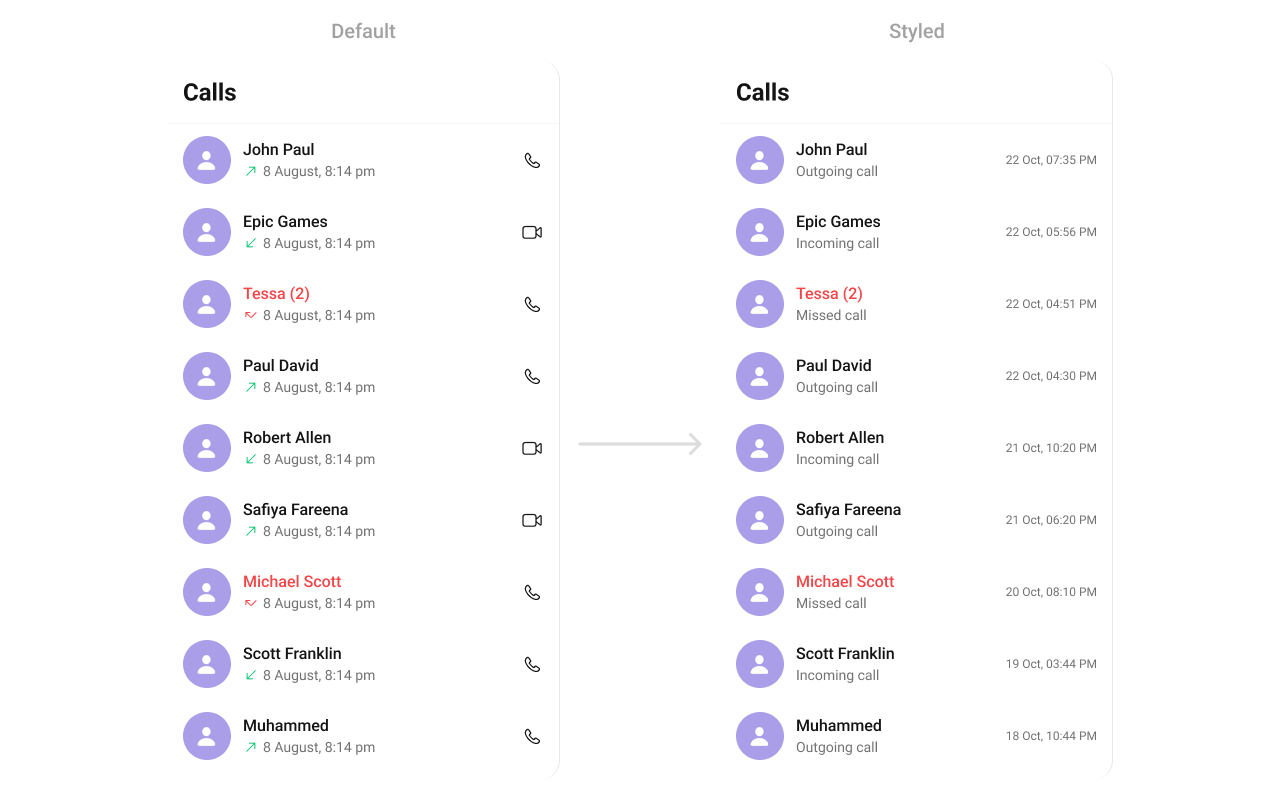 ```swift theme={null}
import UIKit
import CometChatUIKitSwift
import CometChatSDK
import CometChatCallsSDK
class CustomTrailView: UIView {
// MARK: - Properties
private let tailLabel: UILabel = {
let label = UILabel()
label.translatesAutoresizingMaskIntoConstraints = false
label.font = UIFont.systemFont(ofSize: 14, weight: .regular) // Customize font
label.textColor = .darkGray // Customize text color
label.numberOfLines = 1 // Single line
label.textAlignment = .right // Align to the right
return label
}()
// MARK: - Initializers
override init(frame: CGRect) {
super.init(frame: frame)
setupView()
}
required init?(coder: NSCoder) {
super.init(coder: coder)
setupView()
}
// MARK: - Setup
private func setupView() {
addSubview(tailLabel)
// Constraints
NSLayoutConstraint.activate([
tailLabel.leadingAnchor.constraint(equalTo: leadingAnchor, constant: 8),
tailLabel.trailingAnchor.constraint(equalTo: trailingAnchor, constant: -8),
tailLabel.topAnchor.constraint(equalTo: topAnchor, constant: 4),
tailLabel.bottomAnchor.constraint(equalTo: bottomAnchor, constant: -4)
])
}
// MARK: - Configuration
func set(call: CometChatCallsSDK.CallLog) {
tailLabel.text = call.initiatedAt
}
}
```
***
Ensure to pass and present `CometChatCallLogs`. If a navigation controller is already in use, utilize the pushViewController function instead of directly presenting the view controller.
***
```swift theme={null}
import UIKit
import CometChatUIKitSwift
import CometChatSDK
import CometChatCallsSDK
class CustomTrailView: UIView {
// MARK: - Properties
private let tailLabel: UILabel = {
let label = UILabel()
label.translatesAutoresizingMaskIntoConstraints = false
label.font = UIFont.systemFont(ofSize: 14, weight: .regular) // Customize font
label.textColor = .darkGray // Customize text color
label.numberOfLines = 1 // Single line
label.textAlignment = .right // Align to the right
return label
}()
// MARK: - Initializers
override init(frame: CGRect) {
super.init(frame: frame)
setupView()
}
required init?(coder: NSCoder) {
super.init(coder: coder)
setupView()
}
// MARK: - Setup
private func setupView() {
addSubview(tailLabel)
// Constraints
NSLayoutConstraint.activate([
tailLabel.leadingAnchor.constraint(equalTo: leadingAnchor, constant: 8),
tailLabel.trailingAnchor.constraint(equalTo: trailingAnchor, constant: -8),
tailLabel.topAnchor.constraint(equalTo: topAnchor, constant: 4),
tailLabel.bottomAnchor.constraint(equalTo: bottomAnchor, constant: -4)
])
}
// MARK: - Configuration
func set(call: CometChatCallsSDK.CallLog) {
tailLabel.text = call.initiatedAt
}
}
```
***
Ensure to pass and present `CometChatCallLogs`. If a navigation controller is already in use, utilize the pushViewController function instead of directly presenting the view controller.
***