> ## Documentation Index
> Fetch the complete documentation index at: https://cometchat-013b37f0.mintlify.site/llms.txt
> Use this file to discover all available pages before exploring further.
# Call Log Recordings
## Overview
`CometChatCallLogRecordings` is a [Widget](/ui-kit/flutter/v4/components-overview#components) that shows a paginated list of all the calls between the logged-in user & another user or group. This allows the user to see all the calls with a specific user/group they have initiated/received/missed.
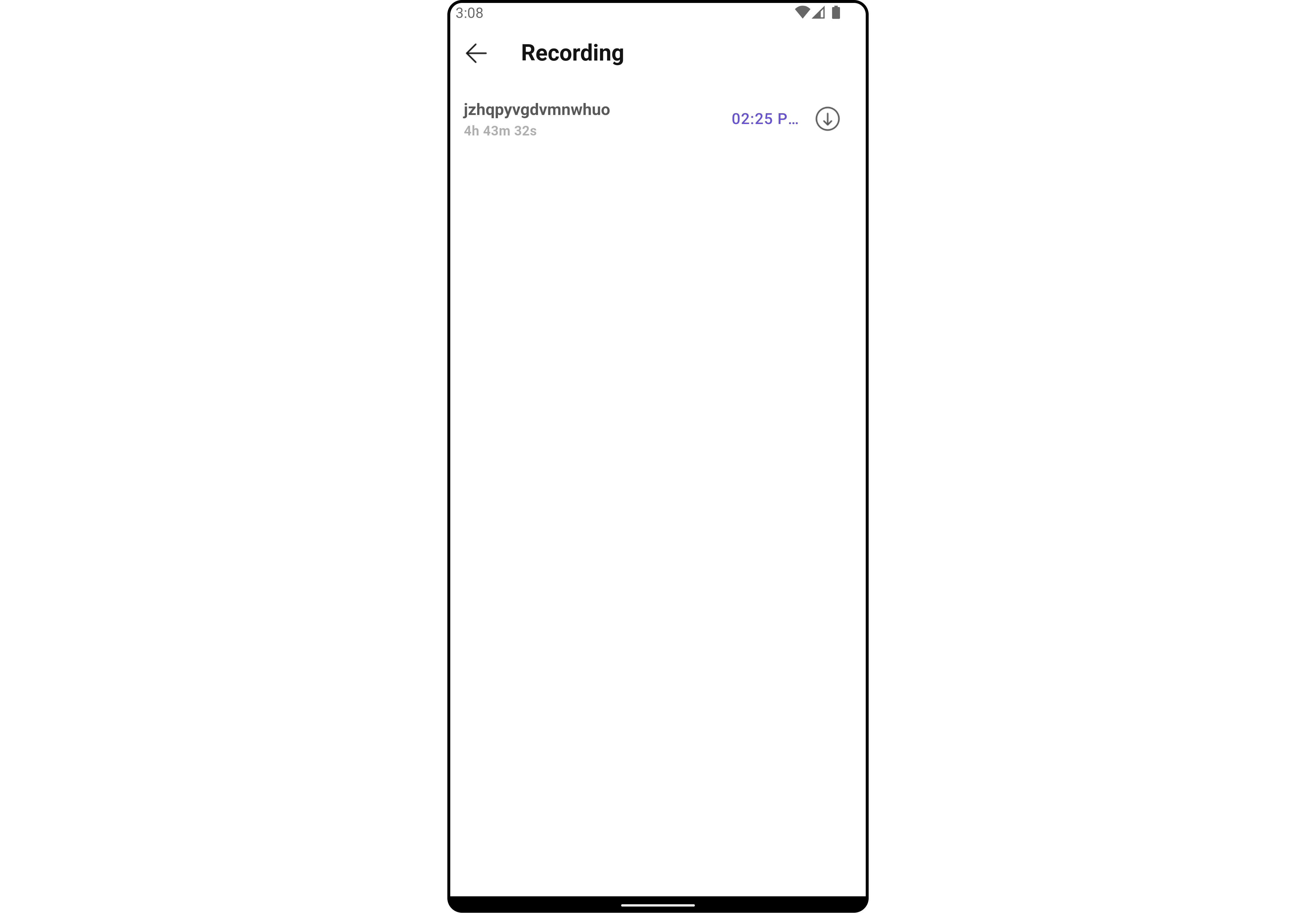
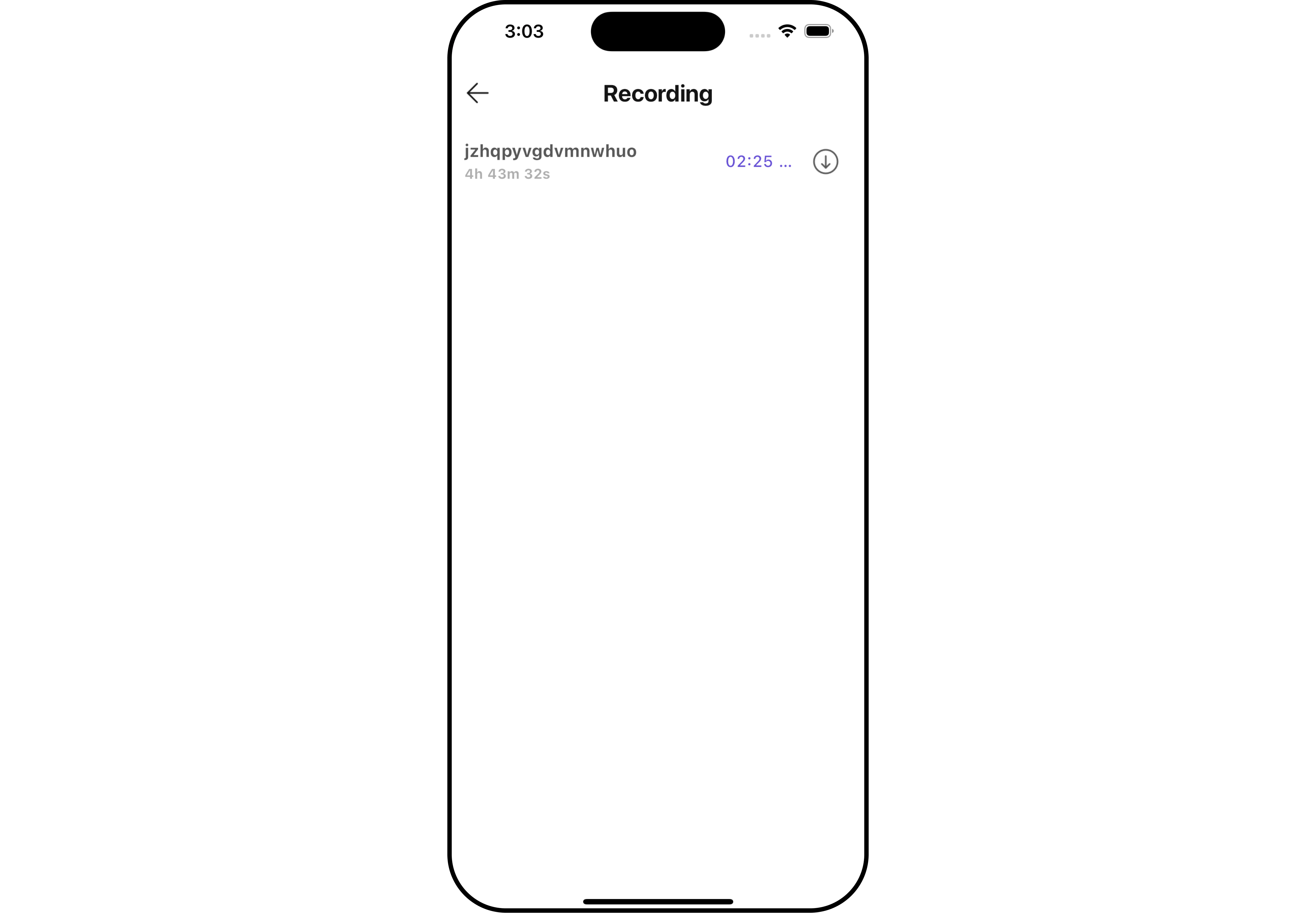 The `CometChatCallLogRecordings` widget is composed of the following BaseWidgets:
| Widgets | Description |
| ------------------------------------------------- | --------------------------------------------------------------------------------------------------------------------------------------------------------------------------------------- |
| [CometChatListBase](/ui-kit/flutter/v4/list-base) | `CometChatListBase` is a container widget featuring a title, customizable background options, and a dedicated list widget for seamless integration within your application's interface. |
| [CometChatListItem](/ui-kit/flutter/v4/list-item) | This widget displays data retrieved from a CallLog object on a card, presenting a title and subtitle. |
## Usage
### Integration
`CometChatCallLogRecordings` is a Widget, it can be seamlessly presented within your application. To display the details of a CallLog, you simply need to pass the corresponding CallLog object to the `CometChatCallLogRecordings` instance using its setCallLog property. This enables you to efficiently showcase specific call log details within your application's interface.
You can launch `CometChatCallLogRecordings` directly using `Navigator.push`, or you can define it as a widget within the `build` method of your `State` class.
##### 1. Using Navigator to Launch `CometChatCallLogRecordings`
```dart theme={null}
Navigator.push(context, MaterialPageRoute(builder: (context) => CometChatCallLogRecordings(callLog: callLogObject))); // CallLog object is required to launch the CometChatCallLogRecordings widget.
```
##### 2. Embedding `CometChatCallLogRecordings` as a Widget in the build Method
```dart theme={null}
import 'package:cometchat_calls_uikit/cometchat_calls_uikit.dart';
import 'package:flutter/material.dart';
class CallLogRecordingsExample extends StatefulWidget {
const CallLogRecordingsExample({super.key});
@override
State createState() => _CallLogRecordingsExampleState();
}
class _CallLogRecordingsExampleState extends State {
@override
Widget build(BuildContext context) {
return Scaffold(
body: SafeArea(
child: CometChatCallLogRecordings(
callLog: callLogObject,
) // CallLog object is required to launch the CometChatCallLogDetails widget.
),
);
}
}
```
***
### Actions
[Actions](/ui-kit/flutter/v4/components-overview#actions) dictate how a widget functions. They are divided into two types: Predefined and User-defined. You can override either type, allowing you to tailor the behavior of the widget to fit your specific needs.
##### 1. onDownloadClick
You can customize this behavior by using the provided code snippet to override the `onDownloadClick` and improve error handling.
```dart theme={null}
CometChatCallLogRecordings(
callLog: callLogObject,
onDownloadClick: (Recordings recording) {
// TODO("Not yet implemented")
},
)
```
***
##### 2. onBack
You can customize this behavior by using the provided code snippet to override the `onBack` and improve error handling.
```dart theme={null}
CometChatCallLogRecordings(
callLog: callLogObject,
onBack: () {
// TODO("Not yet implemented")
},
)
```
***
##### 3. onError
You can customize this behavior by using the provided code snippet to override the `onError` and improve error handling.
```dart theme={null}
CometChatCallLogRecordings(
callLog: callLogObject,
onError: (e) {
// TODO("Not yet implemented")
},
)
```
***
### Filters
**Filters** allow you to customize the data displayed in a list within a Widget. You can filter the list based on your specific criteria, allowing for a more customized. Filters can be applied using RequestBuilders of Chat SDK.
The `CometChatCallLogRecordings` widget does not have any exposed Filters.
***
### Events
[Events](/ui-kit/flutter/v4/components-overview#events) are emitted by a `Widget`. By using event you can extend existing functionality. Being global events, they can be applied in Multiple Locations and are capable of being Added or Removed.
The `CometChatCallLogHistory` widget does not have any exposed events.
***
## Customization
To fit your app's design requirements, you can customize the appearance of the conversation widget. We provide exposed methods that allow you to modify the experience and behavior according to your specific needs.
### Style
Using Style you can customize the look and feel of the widget in your app, These parameters typically control elements such as the color, size, shape, and fonts used within the widget.
##### 1. CallLogHistory Style
You can customize the appearance of the `CallLogHistoryStyle` Widget by applying the `CallLogHistoryStyle` to it using the following code snippet.
```dart theme={null}
CometChatCallLogRecordings(
callLog: callLogObject,
recordingsStyle: CallLogRecordingsStyle(
background: Color(0xFFE4EBF5),
downLoadIconTint: Colors.red,
titleStyle: const TextStyle(color: Colors.red, fontFamily: "PlaywritePL"),
recordingTitleStyle: const TextStyle(color: Colors.red, fontFamily: "PlaywritePL"),
),
)
```
The `CometChatCallLogRecordings` widget is composed of the following BaseWidgets:
| Widgets | Description |
| ------------------------------------------------- | --------------------------------------------------------------------------------------------------------------------------------------------------------------------------------------- |
| [CometChatListBase](/ui-kit/flutter/v4/list-base) | `CometChatListBase` is a container widget featuring a title, customizable background options, and a dedicated list widget for seamless integration within your application's interface. |
| [CometChatListItem](/ui-kit/flutter/v4/list-item) | This widget displays data retrieved from a CallLog object on a card, presenting a title and subtitle. |
## Usage
### Integration
`CometChatCallLogRecordings` is a Widget, it can be seamlessly presented within your application. To display the details of a CallLog, you simply need to pass the corresponding CallLog object to the `CometChatCallLogRecordings` instance using its setCallLog property. This enables you to efficiently showcase specific call log details within your application's interface.
You can launch `CometChatCallLogRecordings` directly using `Navigator.push`, or you can define it as a widget within the `build` method of your `State` class.
##### 1. Using Navigator to Launch `CometChatCallLogRecordings`
```dart theme={null}
Navigator.push(context, MaterialPageRoute(builder: (context) => CometChatCallLogRecordings(callLog: callLogObject))); // CallLog object is required to launch the CometChatCallLogRecordings widget.
```
##### 2. Embedding `CometChatCallLogRecordings` as a Widget in the build Method
```dart theme={null}
import 'package:cometchat_calls_uikit/cometchat_calls_uikit.dart';
import 'package:flutter/material.dart';
class CallLogRecordingsExample extends StatefulWidget {
const CallLogRecordingsExample({super.key});
@override
State createState() => _CallLogRecordingsExampleState();
}
class _CallLogRecordingsExampleState extends State {
@override
Widget build(BuildContext context) {
return Scaffold(
body: SafeArea(
child: CometChatCallLogRecordings(
callLog: callLogObject,
) // CallLog object is required to launch the CometChatCallLogDetails widget.
),
);
}
}
```
***
### Actions
[Actions](/ui-kit/flutter/v4/components-overview#actions) dictate how a widget functions. They are divided into two types: Predefined and User-defined. You can override either type, allowing you to tailor the behavior of the widget to fit your specific needs.
##### 1. onDownloadClick
You can customize this behavior by using the provided code snippet to override the `onDownloadClick` and improve error handling.
```dart theme={null}
CometChatCallLogRecordings(
callLog: callLogObject,
onDownloadClick: (Recordings recording) {
// TODO("Not yet implemented")
},
)
```
***
##### 2. onBack
You can customize this behavior by using the provided code snippet to override the `onBack` and improve error handling.
```dart theme={null}
CometChatCallLogRecordings(
callLog: callLogObject,
onBack: () {
// TODO("Not yet implemented")
},
)
```
***
##### 3. onError
You can customize this behavior by using the provided code snippet to override the `onError` and improve error handling.
```dart theme={null}
CometChatCallLogRecordings(
callLog: callLogObject,
onError: (e) {
// TODO("Not yet implemented")
},
)
```
***
### Filters
**Filters** allow you to customize the data displayed in a list within a Widget. You can filter the list based on your specific criteria, allowing for a more customized. Filters can be applied using RequestBuilders of Chat SDK.
The `CometChatCallLogRecordings` widget does not have any exposed Filters.
***
### Events
[Events](/ui-kit/flutter/v4/components-overview#events) are emitted by a `Widget`. By using event you can extend existing functionality. Being global events, they can be applied in Multiple Locations and are capable of being Added or Removed.
The `CometChatCallLogHistory` widget does not have any exposed events.
***
## Customization
To fit your app's design requirements, you can customize the appearance of the conversation widget. We provide exposed methods that allow you to modify the experience and behavior according to your specific needs.
### Style
Using Style you can customize the look and feel of the widget in your app, These parameters typically control elements such as the color, size, shape, and fonts used within the widget.
##### 1. CallLogHistory Style
You can customize the appearance of the `CallLogHistoryStyle` Widget by applying the `CallLogHistoryStyle` to it using the following code snippet.
```dart theme={null}
CometChatCallLogRecordings(
callLog: callLogObject,
recordingsStyle: CallLogRecordingsStyle(
background: Color(0xFFE4EBF5),
downLoadIconTint: Colors.red,
titleStyle: const TextStyle(color: Colors.red, fontFamily: "PlaywritePL"),
recordingTitleStyle: const TextStyle(color: Colors.red, fontFamily: "PlaywritePL"),
),
)
```
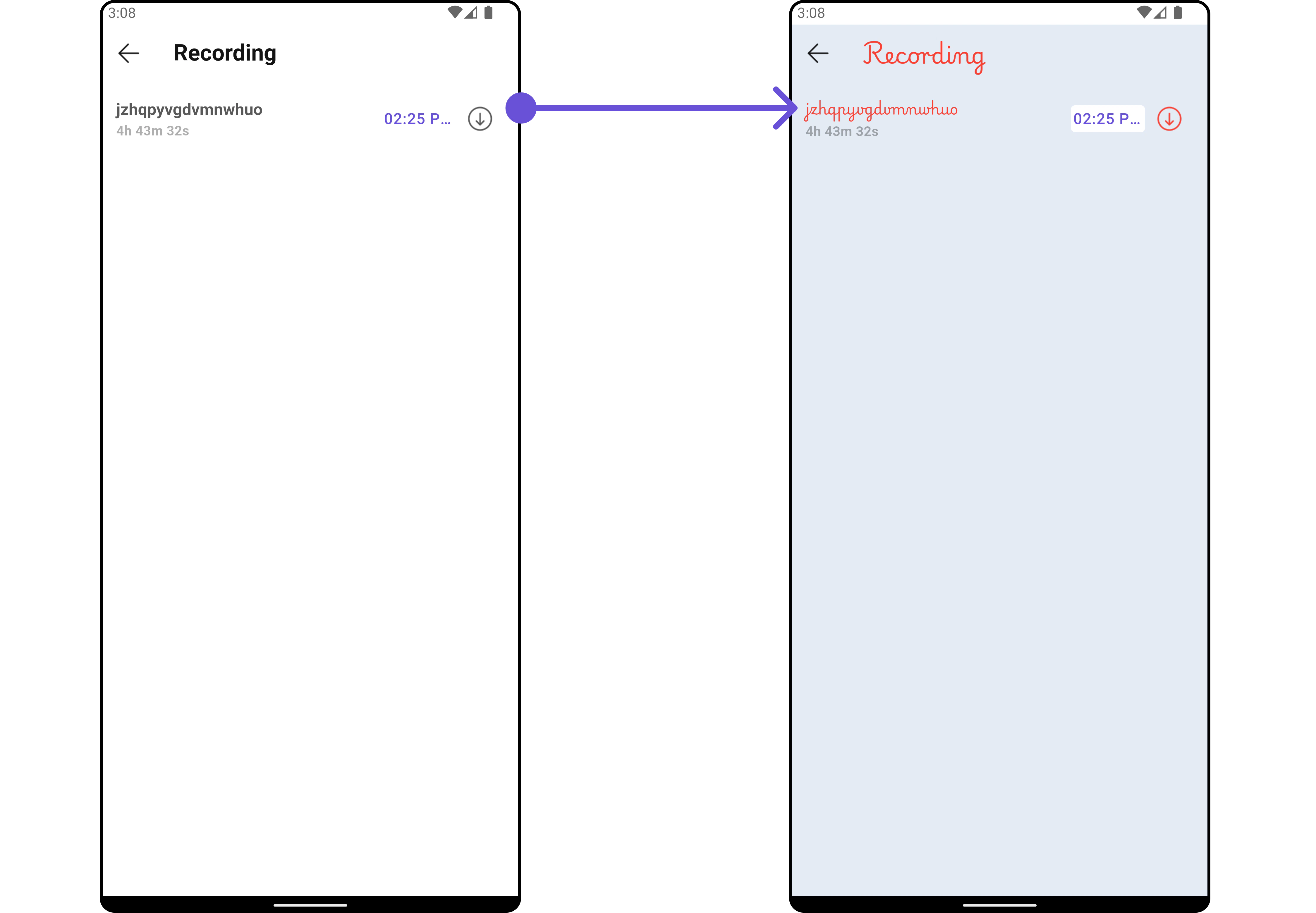
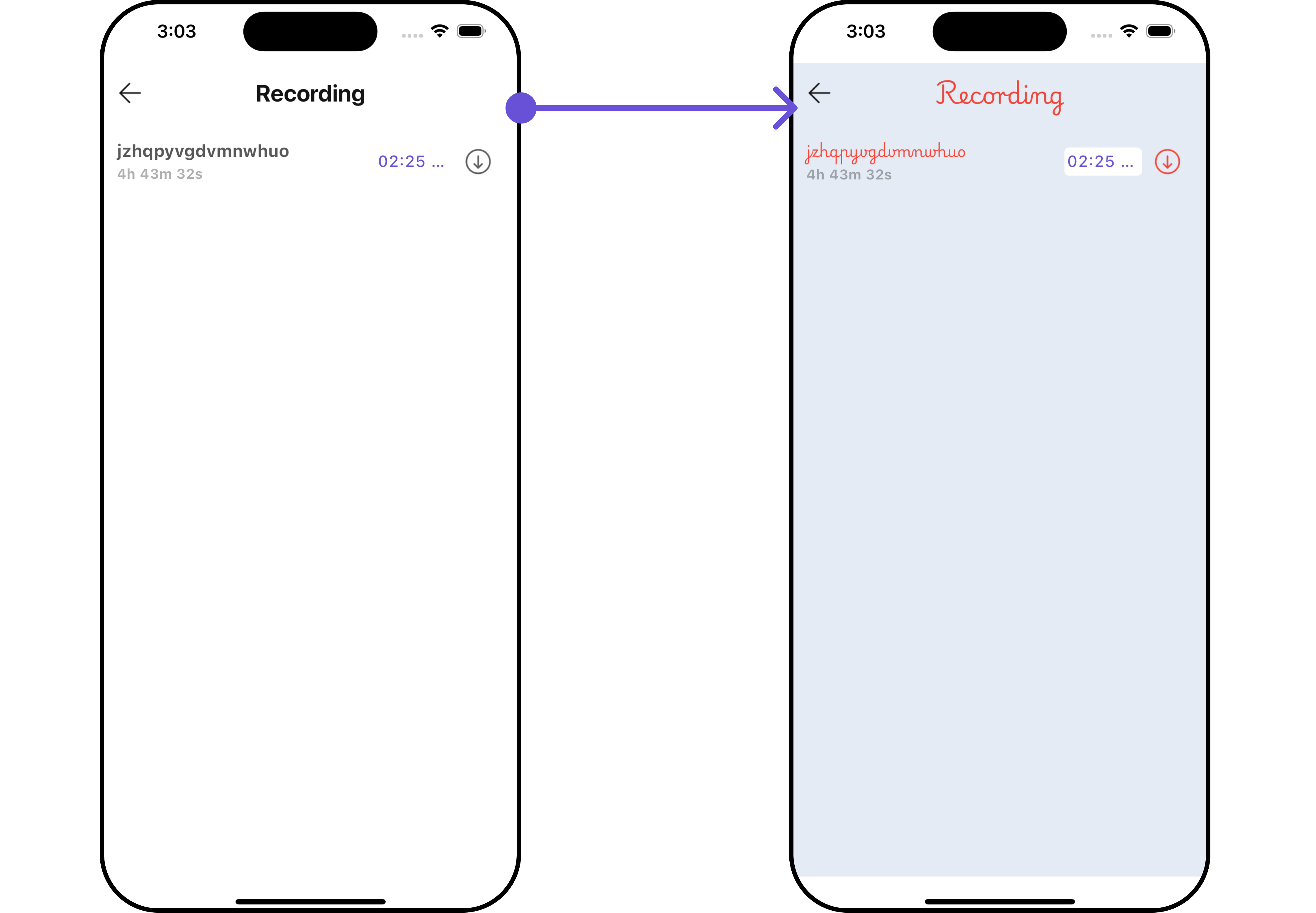 List of properties exposed by `CallLogHistoryStyle`
| **Property** | **Description** | **Code** |
| ----------------------- | -------------------------------------------- | -------------------------------- |
| **width** | The width of the call log recordings style. | `double? width` |
| **height** | The height of the call log recordings style. | `double? height` |
| **background** | The background color. | `Color? background` |
| **border** | The border of the call log recordings style. | `BoxBorder? border` |
| **borderRadius** | The border radius. | `double? borderRadius` |
| **gradient** | The gradient for the background. | `Gradient? gradient` |
| **titleStyle** | The text style for the title. | `TextStyle? titleStyle` |
| **dividerTint** | The tint color for dividers. | `Color? dividerTint` |
| **emptyTextStyle** | The text style for the empty state. | `TextStyle? emptyTextStyle` |
| **backIconTint** | The tint color for the back icon. | `Color? backIconTint` |
| **tailTitleStyle** | The text style for the tail title. | `TextStyle? tailTitleStyle` |
| **recordingTitleStyle** | The text style for the recording title. | `TextStyle? recordingTitleStyle` |
| **durationTextStyle** | The text style for the duration. | `TextStyle? durationTextStyle` |
| **downLoadIconTint** | The tint color for the download icon. | `Color? downLoadIconTint` |
***
### Functionality
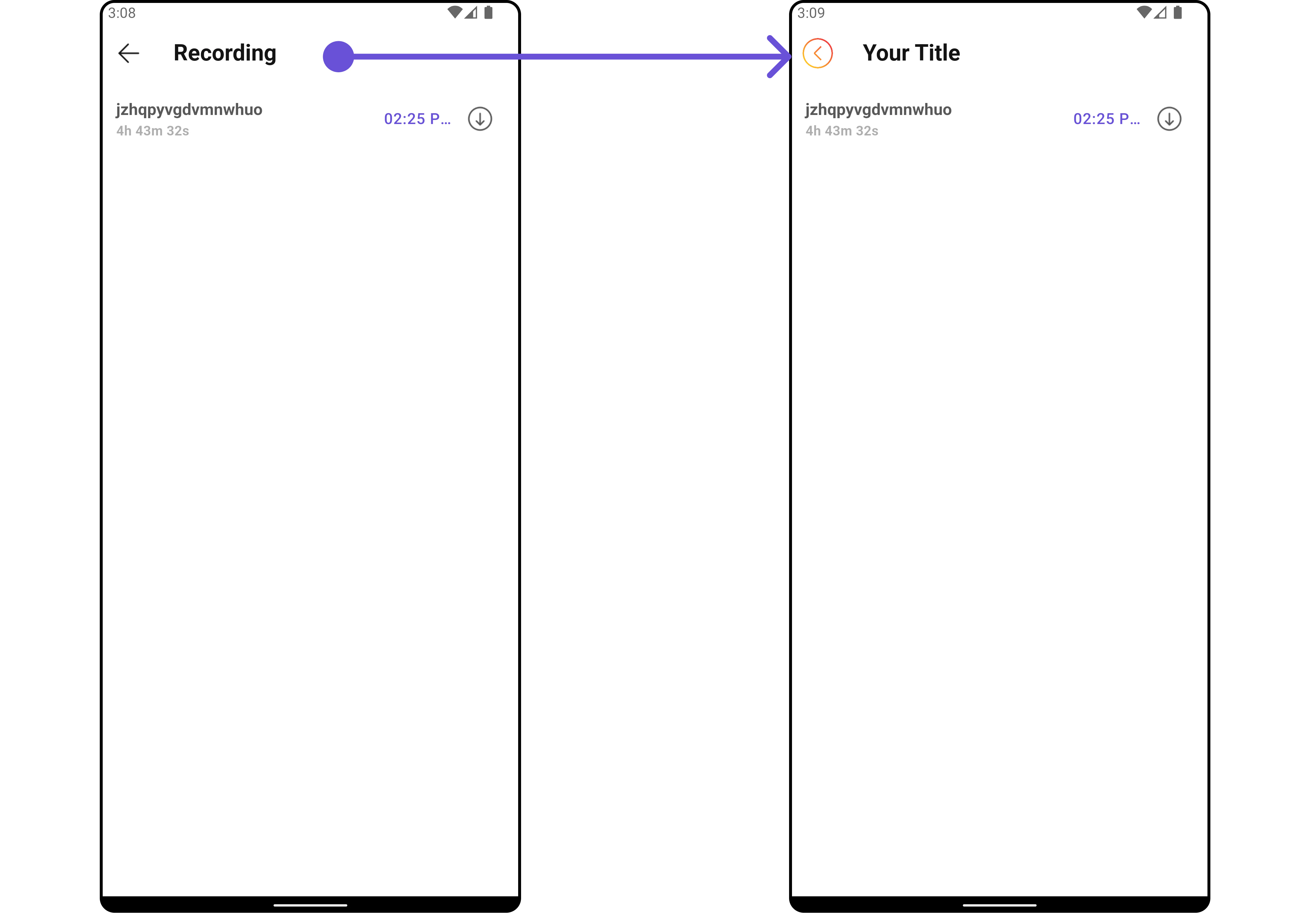
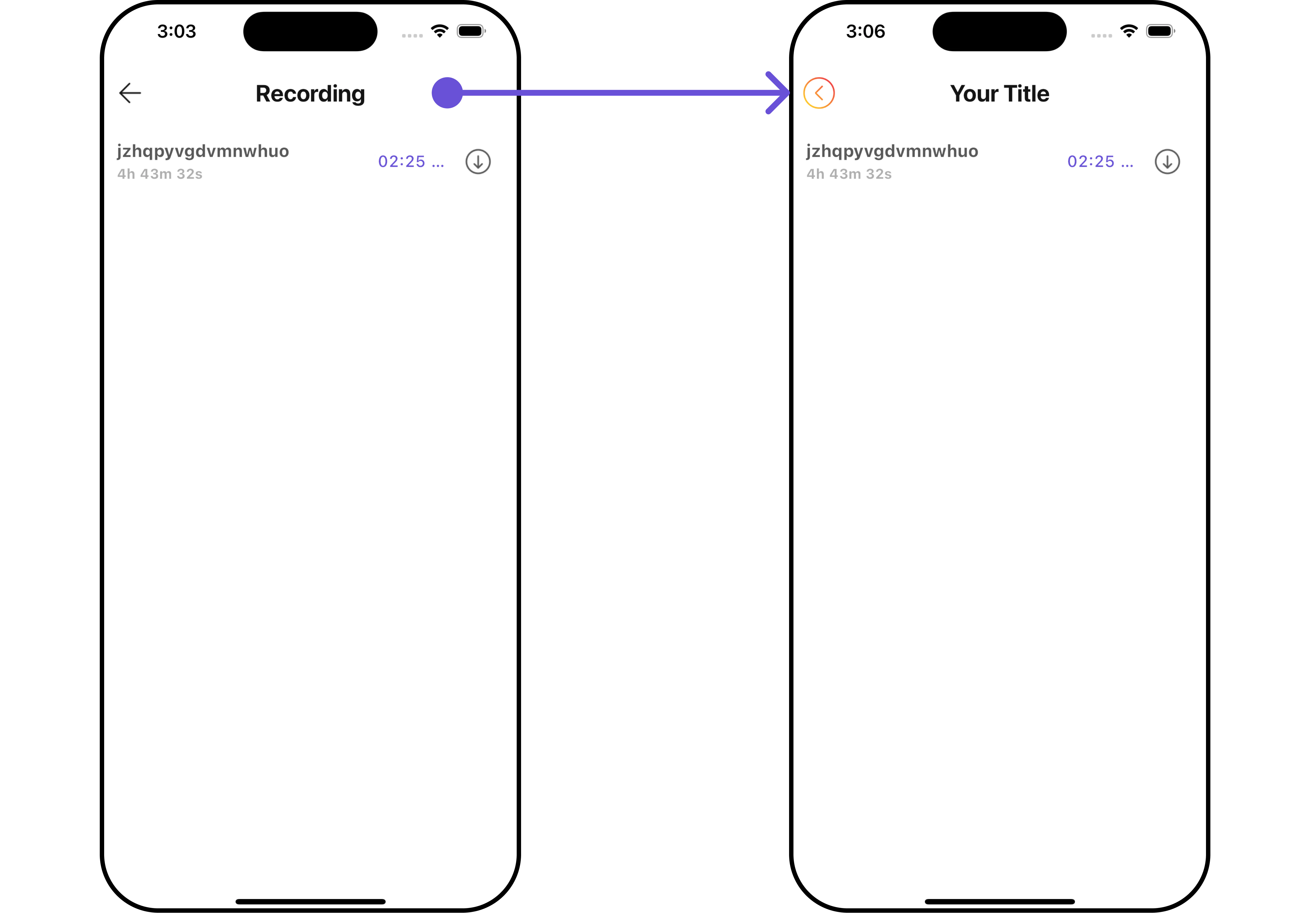
These are a set of small functional customizations that allow you to fine-tune the overall experience of the widget. With these, you can change text, set custom icons, and toggle the visibility of UI elements.
```dart theme={null}
CometChatCallLogRecordings(
callLog: callLogObject,
title: "Your Title",
backButton: Image.asset(
"assets/img/back.png",
width: 30,
height: 30,
),
)
```
List of properties exposed by `CallLogHistoryStyle`
| **Property** | **Description** | **Code** |
| ----------------------- | -------------------------------------------- | -------------------------------- |
| **width** | The width of the call log recordings style. | `double? width` |
| **height** | The height of the call log recordings style. | `double? height` |
| **background** | The background color. | `Color? background` |
| **border** | The border of the call log recordings style. | `BoxBorder? border` |
| **borderRadius** | The border radius. | `double? borderRadius` |
| **gradient** | The gradient for the background. | `Gradient? gradient` |
| **titleStyle** | The text style for the title. | `TextStyle? titleStyle` |
| **dividerTint** | The tint color for dividers. | `Color? dividerTint` |
| **emptyTextStyle** | The text style for the empty state. | `TextStyle? emptyTextStyle` |
| **backIconTint** | The tint color for the back icon. | `Color? backIconTint` |
| **tailTitleStyle** | The text style for the tail title. | `TextStyle? tailTitleStyle` |
| **recordingTitleStyle** | The text style for the recording title. | `TextStyle? recordingTitleStyle` |
| **durationTextStyle** | The text style for the duration. | `TextStyle? durationTextStyle` |
| **downLoadIconTint** | The tint color for the download icon. | `Color? downLoadIconTint` |
***
### Functionality
These are a set of small functional customizations that allow you to fine-tune the overall experience of the widget. With these, you can change text, set custom icons, and toggle the visibility of UI elements.
```dart theme={null}
CometChatCallLogRecordings(
callLog: callLogObject,
title: "Your Title",
backButton: Image.asset(
"assets/img/back.png",
width: 30,
height: 30,
),
)
```
 List of methods exposed by `CometChatCallLogHistory`
| **Property** | **Description** | **Code** |
| ------------------- | ------------------------------------------------- | ------------------------- |
| **title** | The title of the call log recordings. | `String? title` |
| **backButton** | The back button widget. | `Widget? backButton` |
| **showBackButton** | Indicates whether to show the back button. | `bool? showBackButton` |
| **emptyStateText** | The text to display when there are no recordings. | `String? emptyStateText` |
| **theme** | The theme for the widget. | `CometChatTheme? theme` |
| **datePattern** | The pattern for displaying dates. | `String? datePattern` |
| **hideSeparator** | Indicates whether to hide separators. | `bool hideSeparator` |
| **downloadIconUrl** | The URL for the download icon. | `String? downloadIconUrl` |
***
### Advanced
For advanced-level customization, you can set custom widgets to the widget. This lets you tailor each aspect of the widget to fit your exact needs and application aesthetics. You can create and define your widgets, layouts, and UI elements and then incorporate those into the widget.
#### ListItemView
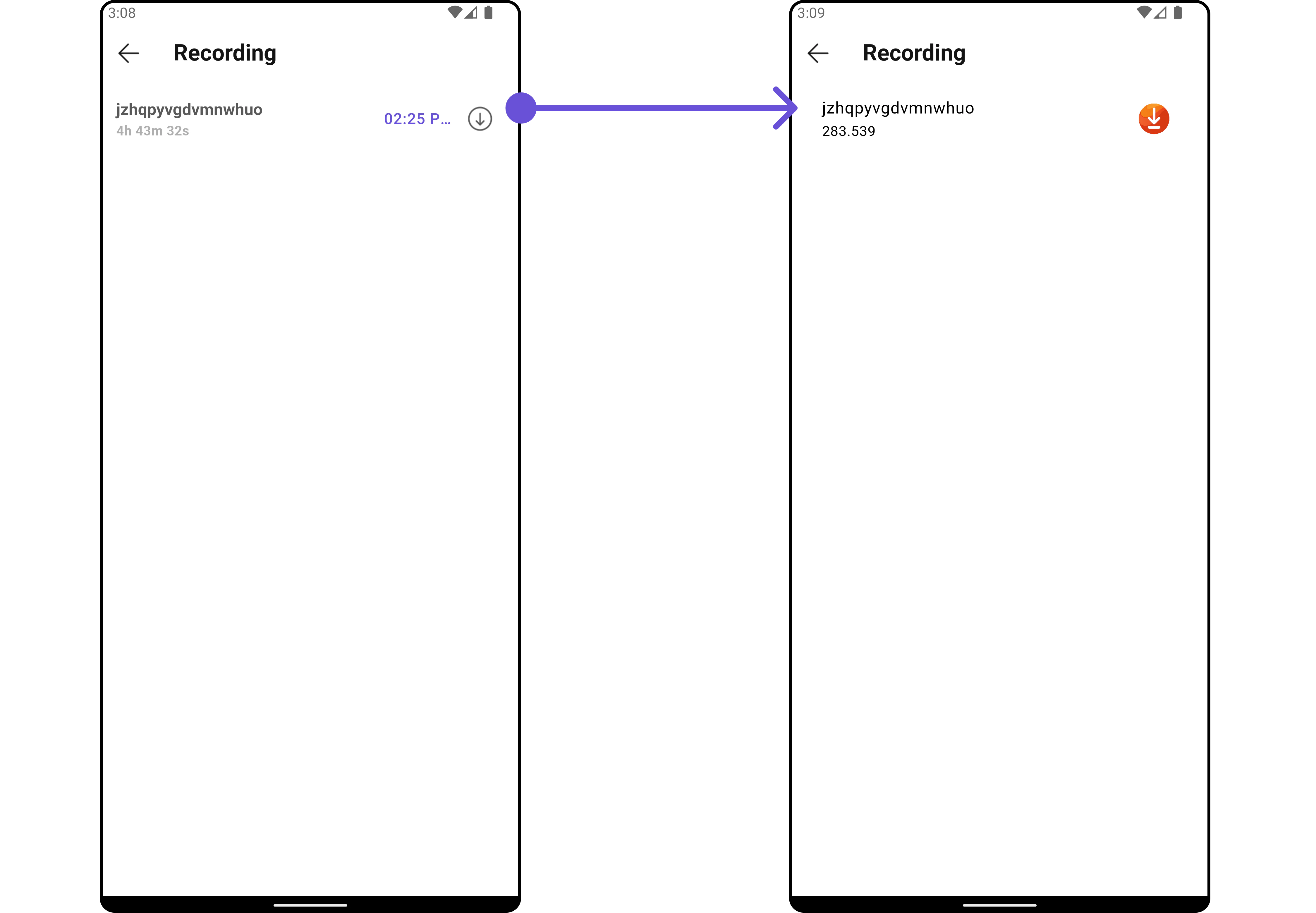
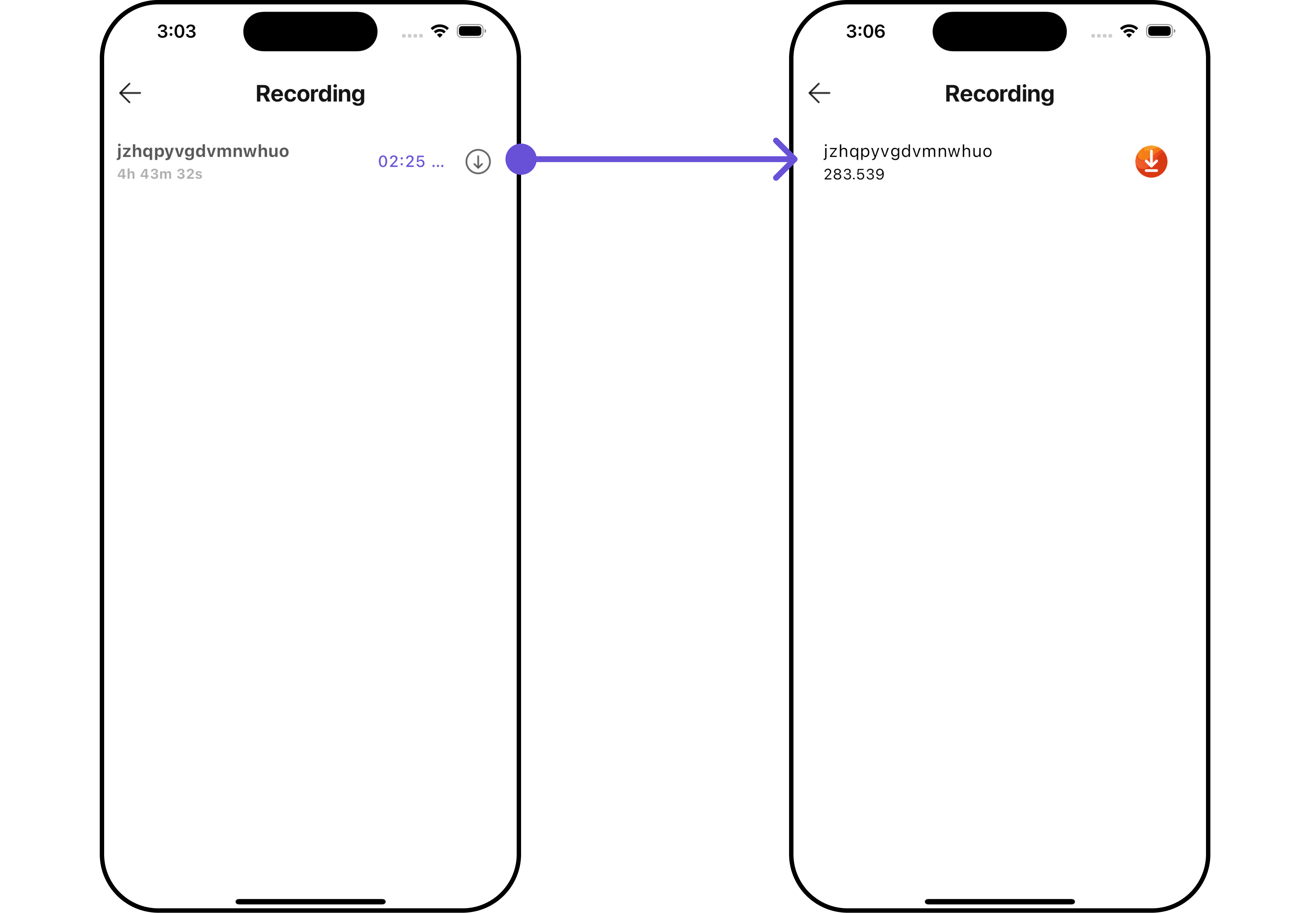
With this function, you can assign a custom ListItem widget to the `CometChatCallLogRecordings` Widget.
```dart theme={null}
CometChatCallLogRecordings(
callLog: callLogObject,
listItemView: (Recordings recording, BuildContext context) {
return ListTile(
title: Text(recording.rid ?? ""),
subtitle: Text(recording.duration != null ? "${recording.duration}" : "00:00"),
trailing: SizedBox(
width: 30,
child: InkWell(
onTap: () {
// TODO("Not yet implemented")
},
child: Image.asset("assets/img/downloading.png", width: 30, height: 30),
),
)
);
},
)
```
List of methods exposed by `CometChatCallLogHistory`
| **Property** | **Description** | **Code** |
| ------------------- | ------------------------------------------------- | ------------------------- |
| **title** | The title of the call log recordings. | `String? title` |
| **backButton** | The back button widget. | `Widget? backButton` |
| **showBackButton** | Indicates whether to show the back button. | `bool? showBackButton` |
| **emptyStateText** | The text to display when there are no recordings. | `String? emptyStateText` |
| **theme** | The theme for the widget. | `CometChatTheme? theme` |
| **datePattern** | The pattern for displaying dates. | `String? datePattern` |
| **hideSeparator** | Indicates whether to hide separators. | `bool hideSeparator` |
| **downloadIconUrl** | The URL for the download icon. | `String? downloadIconUrl` |
***
### Advanced
For advanced-level customization, you can set custom widgets to the widget. This lets you tailor each aspect of the widget to fit your exact needs and application aesthetics. You can create and define your widgets, layouts, and UI elements and then incorporate those into the widget.
#### ListItemView
With this function, you can assign a custom ListItem widget to the `CometChatCallLogRecordings` Widget.
```dart theme={null}
CometChatCallLogRecordings(
callLog: callLogObject,
listItemView: (Recordings recording, BuildContext context) {
return ListTile(
title: Text(recording.rid ?? ""),
subtitle: Text(recording.duration != null ? "${recording.duration}" : "00:00"),
trailing: SizedBox(
width: 30,
child: InkWell(
onTap: () {
// TODO("Not yet implemented")
},
child: Image.asset("assets/img/downloading.png", width: 30, height: 30),
),
)
);
},
)
```
 ***
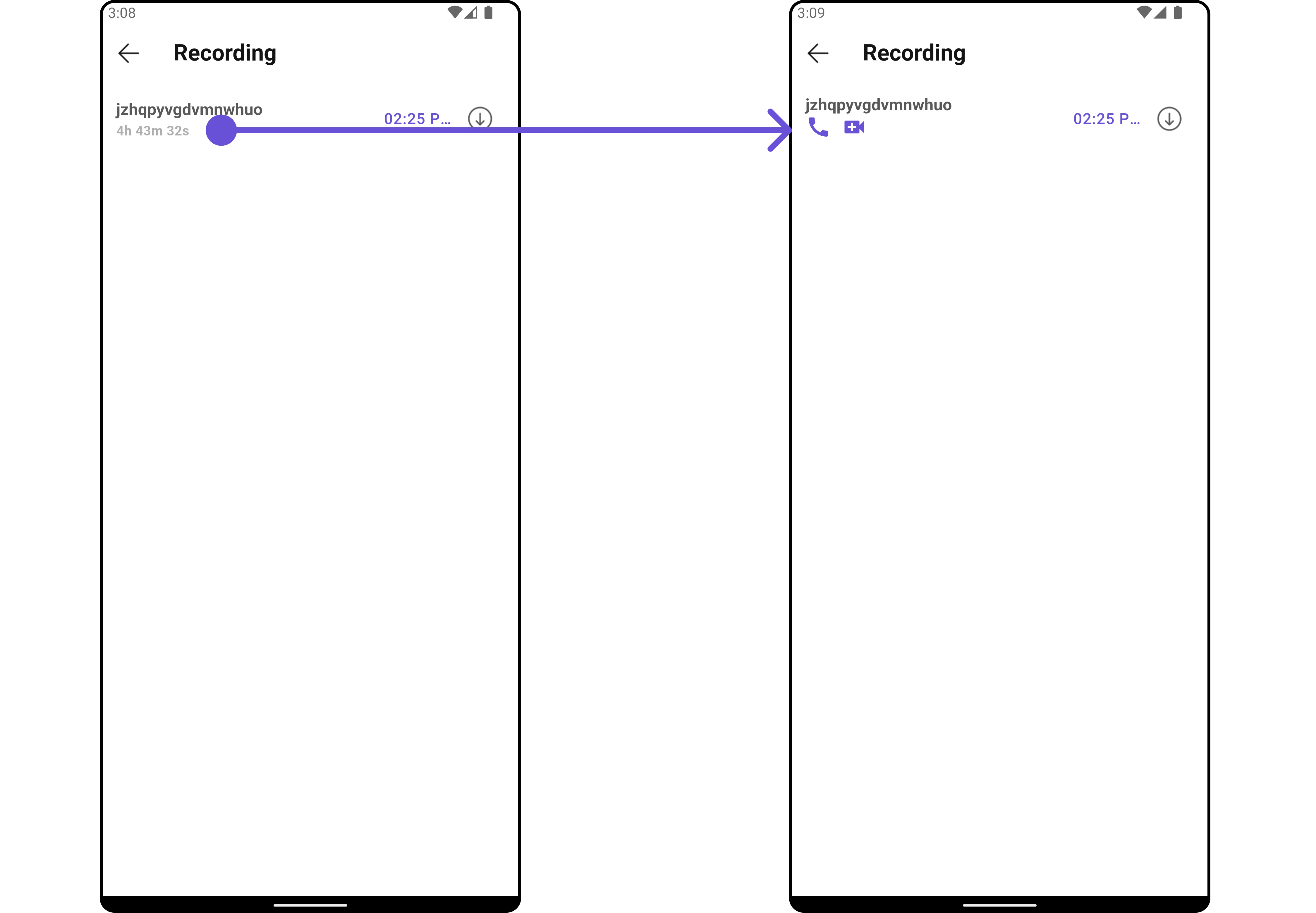
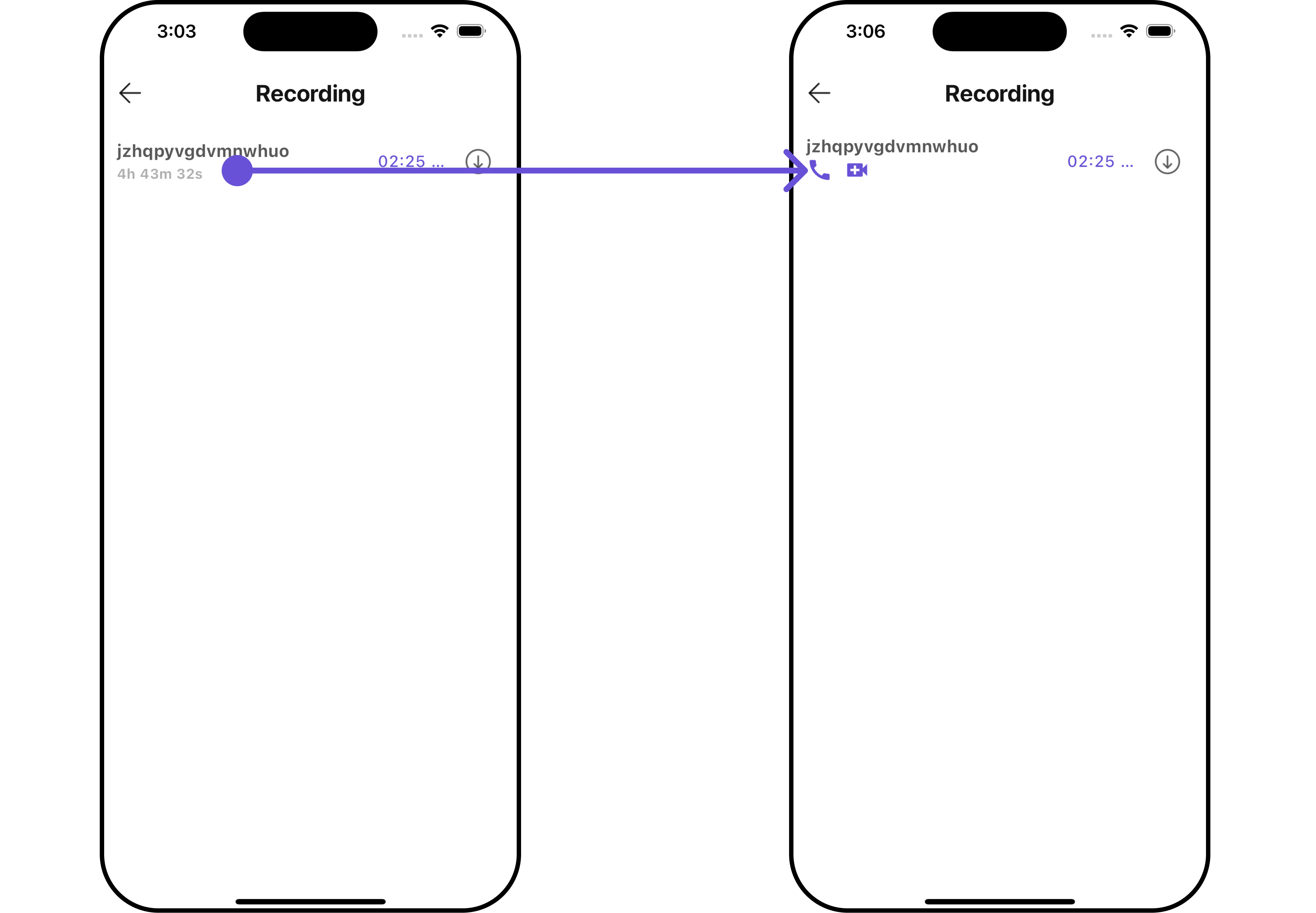
#### SubtitleView
You can customize the subtitle widget for each conversation item to meet your requirements
```dart theme={null}
CometChatCallLogRecordings(
callLog: callLogObject,
subTitleView: (Recordings recording, BuildContext context) {
return Row(
children: [
InkWell(
onTap: () {
// TODO("Not yet implemented")
},
child: const Icon(Icons.call, color: Color(0xFF6851D6), size: 25)
),
const SizedBox(width: 10),
InkWell(
onTap: () {
// TODO("Not yet implemented")
},
child: const Icon(Icons.video_call, color: Color(0xFF6851D6), size: 25)
),
],
);
},
)
```
***
#### SubtitleView
You can customize the subtitle widget for each conversation item to meet your requirements
```dart theme={null}
CometChatCallLogRecordings(
callLog: callLogObject,
subTitleView: (Recordings recording, BuildContext context) {
return Row(
children: [
InkWell(
onTap: () {
// TODO("Not yet implemented")
},
child: const Icon(Icons.call, color: Color(0xFF6851D6), size: 25)
),
const SizedBox(width: 10),
InkWell(
onTap: () {
// TODO("Not yet implemented")
},
child: const Icon(Icons.video_call, color: Color(0xFF6851D6), size: 25)
),
],
);
},
)
```
 ***
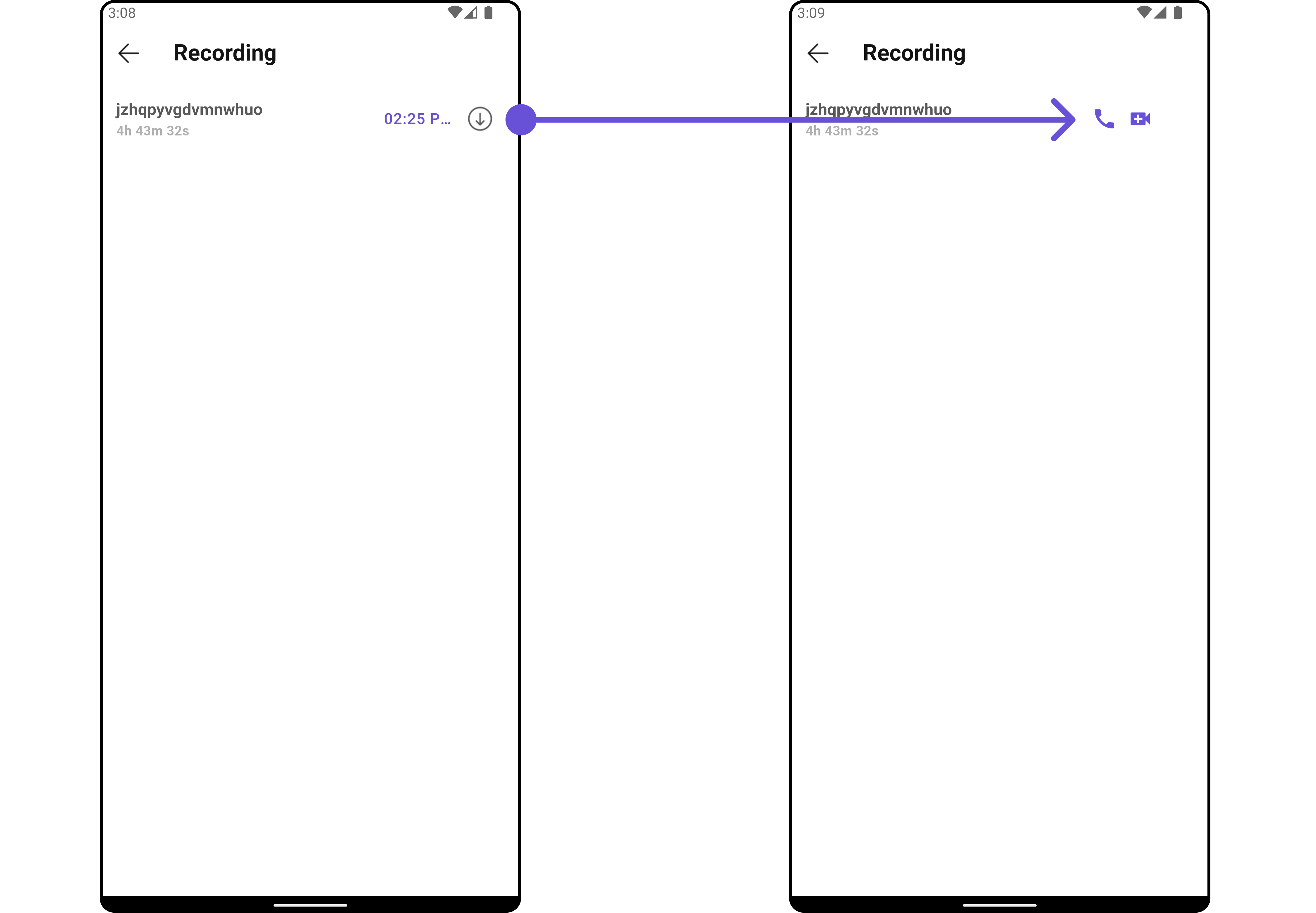
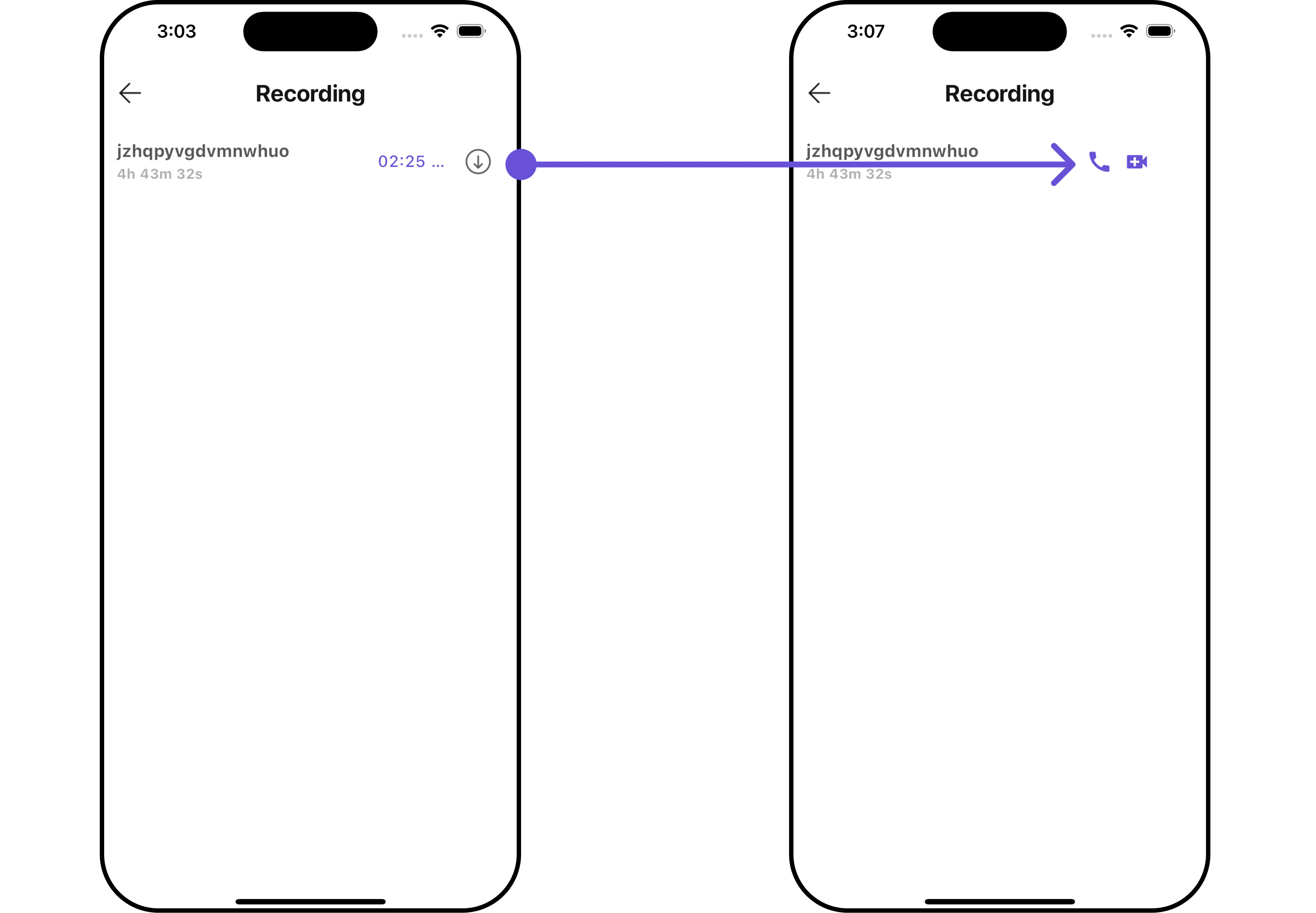
#### TailView
Used to generate a custom trailing widget for the `CometChatCallLogRecordings` widget. You can add a Tail widget using the following method.
```dart theme={null}
CometChatCallLogRecordings(
callLog: callLogObject,
tailView: (BuildContext context, Recordings recordings) {
return SizedBox(
width: 100,
child: Row(
children: [
InkWell(
onTap: () {
// TODO("Not yet implemented")
},
child: const Icon(Icons.call, color: Color(0xFF6851D6), size: 25)
),
const SizedBox(width: 10),
InkWell(
onTap: () {
// TODO("Not yet implemented")
},
child: const Icon(Icons.video_call, color: Color(0xFF6851D6), size: 25)
),
],
),
);
},
)
```
***
#### TailView
Used to generate a custom trailing widget for the `CometChatCallLogRecordings` widget. You can add a Tail widget using the following method.
```dart theme={null}
CometChatCallLogRecordings(
callLog: callLogObject,
tailView: (BuildContext context, Recordings recordings) {
return SizedBox(
width: 100,
child: Row(
children: [
InkWell(
onTap: () {
// TODO("Not yet implemented")
},
child: const Icon(Icons.call, color: Color(0xFF6851D6), size: 25)
),
const SizedBox(width: 10),
InkWell(
onTap: () {
// TODO("Not yet implemented")
},
child: const Icon(Icons.video_call, color: Color(0xFF6851D6), size: 25)
),
],
),
);
},
)
```
 ***
#### EmptyStateView
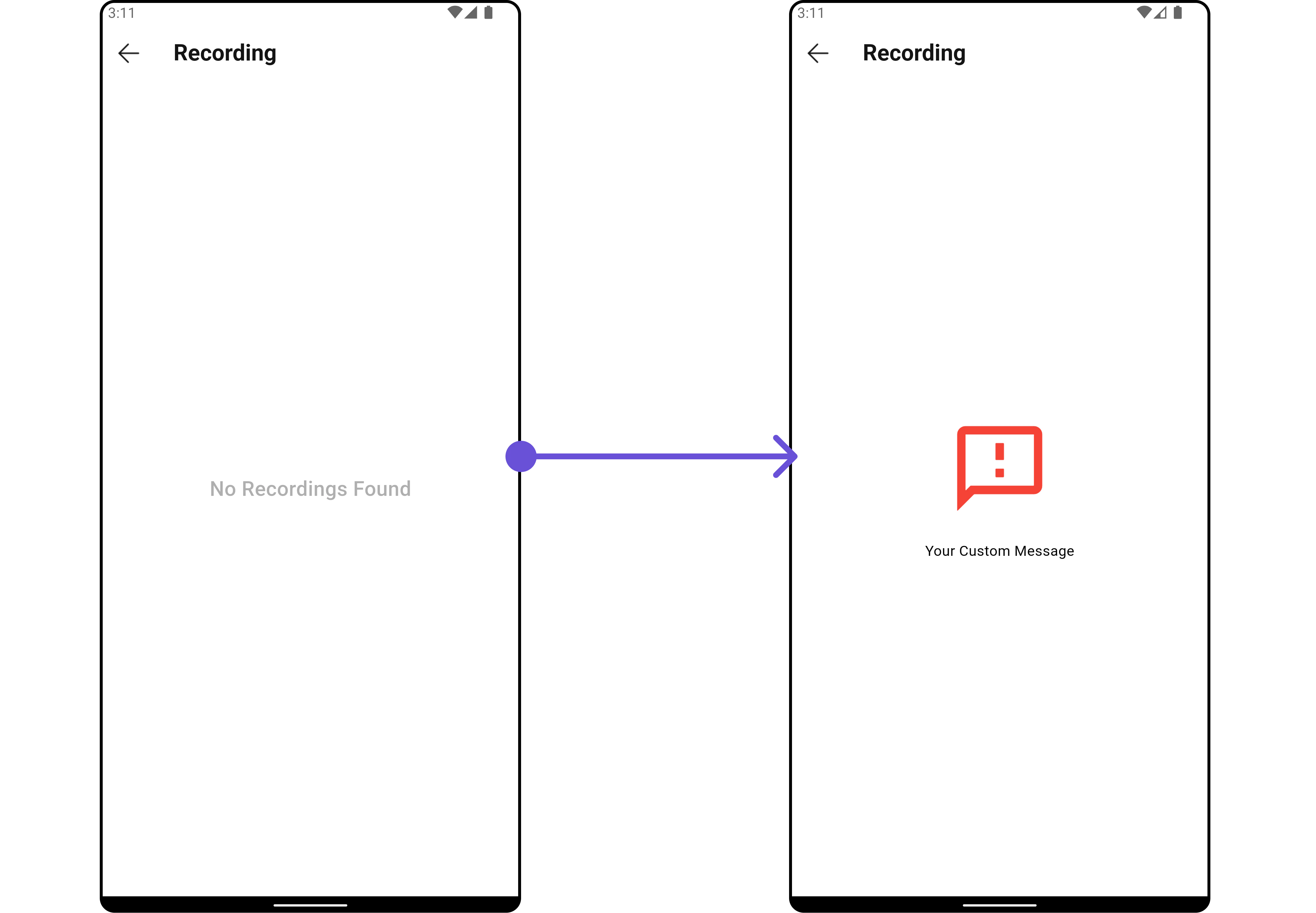
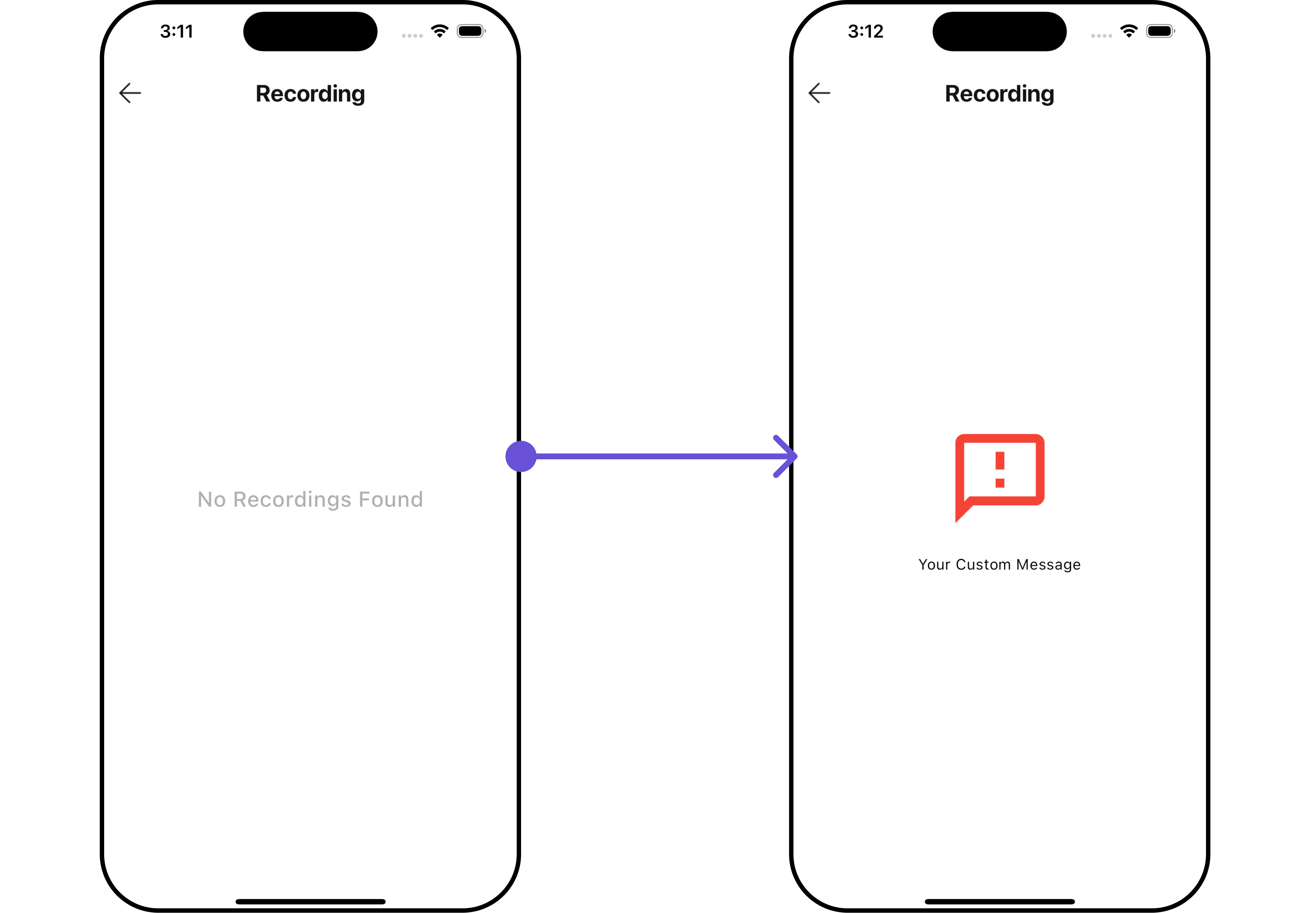
You can set a custom `EmptyStateView` using `emptyStateView` to match the empty UI of your app.
```dart theme={null}
CometChatCallLogRecordings(
callLog: callLogObject,
emptyStateView: (context) {
return SizedBox(
width: MediaQuery.of(context).size.width,
child: const Center(
child: Column(
crossAxisAlignment: CrossAxisAlignment.center,
mainAxisAlignment: MainAxisAlignment.center,
children: [
Spacer(),
Icon(Icons.sms_failed_outlined, color: Colors.red, size: 100,),
SizedBox(height: 20,),
Text("Your Custom Message"),
Spacer(),
],
)
),
);
},
)
```
***
#### EmptyStateView
You can set a custom `EmptyStateView` using `emptyStateView` to match the empty UI of your app.
```dart theme={null}
CometChatCallLogRecordings(
callLog: callLogObject,
emptyStateView: (context) {
return SizedBox(
width: MediaQuery.of(context).size.width,
child: const Center(
child: Column(
crossAxisAlignment: CrossAxisAlignment.center,
mainAxisAlignment: MainAxisAlignment.center,
children: [
Spacer(),
Icon(Icons.sms_failed_outlined, color: Colors.red, size: 100,),
SizedBox(height: 20,),
Text("Your Custom Message"),
Spacer(),
],
)
),
);
},
)
```
 ***
***