> ## Documentation Index
> Fetch the complete documentation index at: https://cometchat-013b37f0.mintlify.site/llms.txt
> Use this file to discover all available pages before exploring further.
# Managing Legacy Webhook Triggers
You can manage and configure legacy webhooks in CometChat either from the **dashboard UI** or programmatically via **Management APIs**.
***
## Option 1: Manage from the Dashboard
To manage webhooks using the CometChat dashboard:
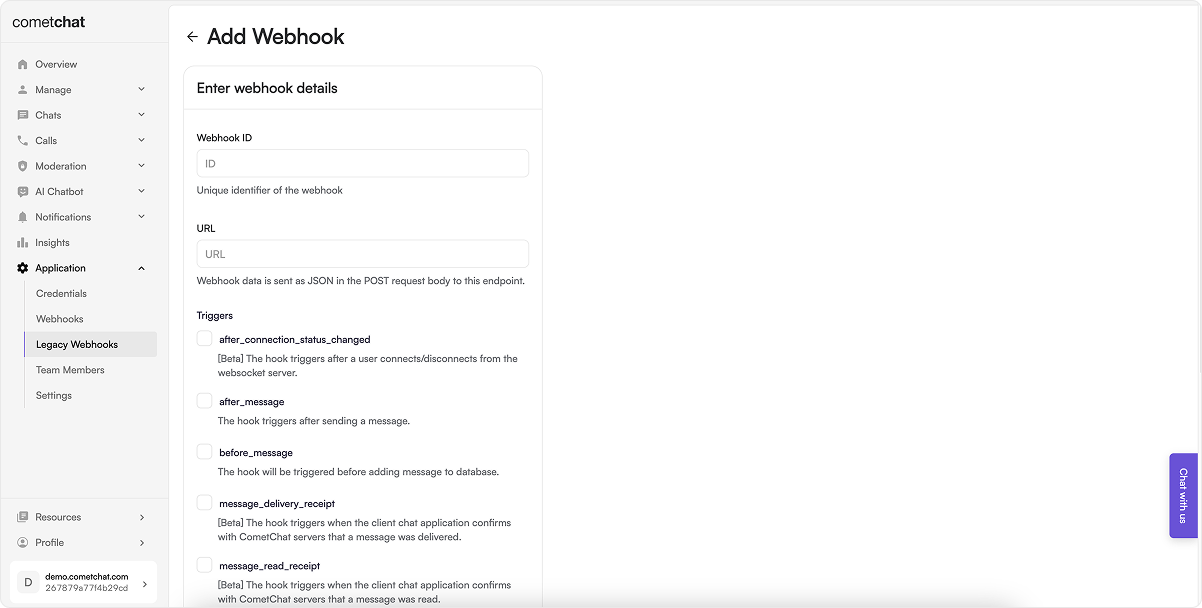 ### Steps:
1. Log in to your [CometChat Dashboard](https://app.cometchat.com/login) and select your app.
2. Go to **Settings** > **Legacy Webhooks** from the left menu.
3. Click on **Add New Webhook**.
4. Fill in the configuration:
* **Webhook ID**: A unique identifier for your webhook.
* **URL**: Endpoint where event payloads will be delivered.
* **Triggers**: Select the events you want to receive.
* **Security**: (Recommended) Enable authentication.
5. Enable the webhook.
6. Save the configuration.
***
## Option 2: Manage via Management APIs
CometChat also provides Management APIs to automate webhook and trigger management.
### Webhook Management Endpoints
| Operation | API Reference |
| -------------------------- | ----------------------------------------------------------------------------- |
| Create a new webhook | [Create Webhook](https://api-explorer.cometchat.com/reference/create-webhook) |
| Update an existing webhook | [Update Webhook](https://api-explorer.cometchat.com/reference/update-webhook) |
| List all webhooks | [List Webhooks](https://api-explorer.cometchat.com/reference/list-webhooks) |
| Get a webhook by ID | [Get Webhook](https://api-explorer.cometchat.com/reference/get-webhook) |
| Delete a webhook | [Delete Webhook](https://api-explorer.cometchat.com/reference/delete-webhook) |
### Trigger Management Endpoints
| Operation | API Reference |
| ------------------------------ | ------------------------------------------------------------------------------- |
| Add triggers to a webhook | [Add Triggers](https://api-explorer.cometchat.com/reference/add-triggers) |
| List all triggers of a webhook | [List Triggers](https://api-explorer.cometchat.com/reference/list-triggers) |
| Remove triggers from a webhook | [Remove Triggers](https://api-explorer.cometchat.com/reference/remove-triggers) |
***
Choose the method that best suits your workflow—dashboard for manual setup or APIs for automated, scalable integration.
### Steps:
1. Log in to your [CometChat Dashboard](https://app.cometchat.com/login) and select your app.
2. Go to **Settings** > **Legacy Webhooks** from the left menu.
3. Click on **Add New Webhook**.
4. Fill in the configuration:
* **Webhook ID**: A unique identifier for your webhook.
* **URL**: Endpoint where event payloads will be delivered.
* **Triggers**: Select the events you want to receive.
* **Security**: (Recommended) Enable authentication.
5. Enable the webhook.
6. Save the configuration.
***
## Option 2: Manage via Management APIs
CometChat also provides Management APIs to automate webhook and trigger management.
### Webhook Management Endpoints
| Operation | API Reference |
| -------------------------- | ----------------------------------------------------------------------------- |
| Create a new webhook | [Create Webhook](https://api-explorer.cometchat.com/reference/create-webhook) |
| Update an existing webhook | [Update Webhook](https://api-explorer.cometchat.com/reference/update-webhook) |
| List all webhooks | [List Webhooks](https://api-explorer.cometchat.com/reference/list-webhooks) |
| Get a webhook by ID | [Get Webhook](https://api-explorer.cometchat.com/reference/get-webhook) |
| Delete a webhook | [Delete Webhook](https://api-explorer.cometchat.com/reference/delete-webhook) |
### Trigger Management Endpoints
| Operation | API Reference |
| ------------------------------ | ------------------------------------------------------------------------------- |
| Add triggers to a webhook | [Add Triggers](https://api-explorer.cometchat.com/reference/add-triggers) |
| List all triggers of a webhook | [List Triggers](https://api-explorer.cometchat.com/reference/list-triggers) |
| Remove triggers from a webhook | [Remove Triggers](https://api-explorer.cometchat.com/reference/remove-triggers) |
***
Choose the method that best suits your workflow—dashboard for manual setup or APIs for automated, scalable integration.